

Normal GPU usage depends on the task. Idle systems usually show 0 to 5%, watching videos may use 5 to 20%, and modern games often reach 85 to 100%. High usage during gaming is normal because the graphics card is working to deliver the best performance.
In this guide, we explain what typical GPU usage looks like across various situations and help you understand when high or low GPU usage is normal.
What Is GPU Usage?
GPU usage measures how much of your graphics card’s processing power is active. Every visual task you see on your screen requires GPU computation. These tasks include rendering frames, processing textures, and calculating lighting effects.
When GPU usage increases, it means the graphics card is performing more calculations.
Typical examples include:
- Watching a video may use 5 to 20 percent
- Playing a modern AAA game may use 90 to 100 percent
- Sitting on the desktop usually stays between 0 and 5 percent
These numbers vary depending on hardware, software optimization, and screen resolution.
If your GPU usage stays high but FPS is still low, your system may be GPU-bound. You can learn exactly how this works in our guide on what does GPU bound means.
What Does GPU Utilization Mean?
GPU utilization describes how busy the graphics processor is. A higher utilization percentage means your GPU is actively rendering frames or processing visual data.
For example, when a game displays complex environments with shadows, reflections, and high-resolution textures, the GPU must calculate millions of pixels every second. This increases utilization.
Lower utilization simply means your GPU still has available performance capacity.
How GPU Load Is Measured?
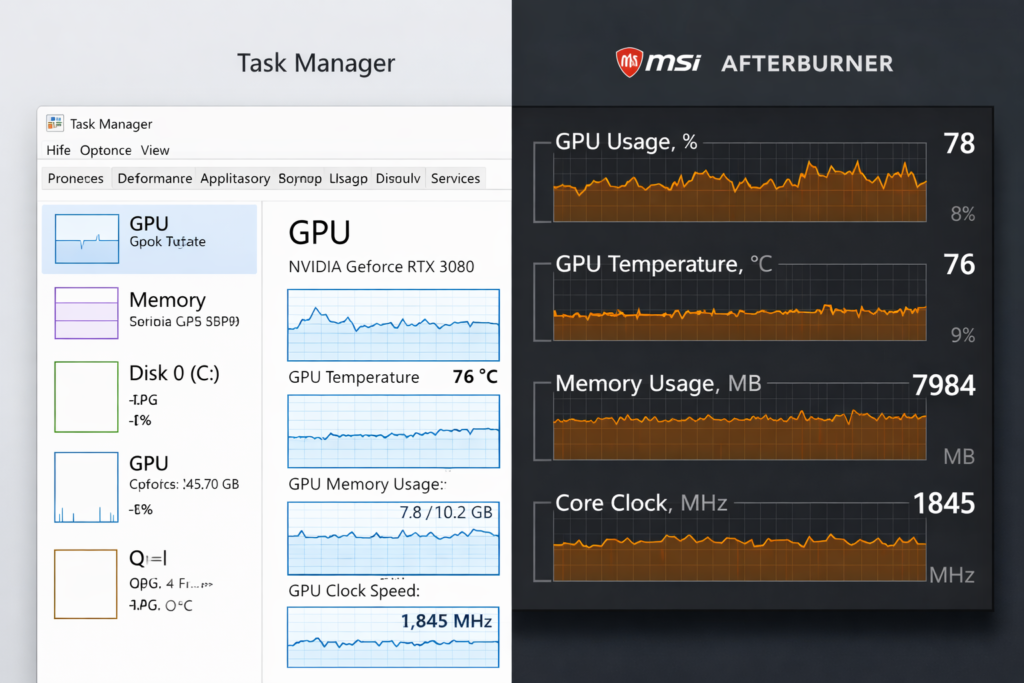
You can measure GPU load using monitoring tools that display performance statistics in real time.
Common tools include:
- Windows Task Manager
- MSI Afterburner
- NVIDIA Performance Overlay
- AMD Adrenalin Software
These tools display several useful metrics:
- GPU usage percentage
- GPU temperature
- VRAM usage
- Core clock speed
- Fan speed
Monitoring these values helps you understand whether your GPU is performing efficiently or facing a bottleneck.
Is 100% GPU Usage Normal?
Yes. In many situations, especially gaming, 100 percent GPU usage is normal and even desirable. It means your graphics card is fully utilized and delivering the best possible performance.
Modern GPUs are designed to operate at full load for extended periods. High usage only becomes concerning when temperatures rise too high or when performance suddenly drops.
Is 98% GPU Usage Ideal?
Yes. GPU usage between 95 and 100 percent during gaming usually indicates efficient hardware usage. The game engine is pushing the graphics card properly, which results in smoother frame delivery.
For example, when playing demanding games at 1440p or 4K resolution, GPUs often remain close to full utilization.
Is 100% GPU Usage Safe?
Running your GPU at full utilization is safe if temperatures stay within the recommended range.
Most modern graphics cards operate between 60 and 85 degrees Celsius during heavy workloads. Manufacturers design GPUs with built-in protection systems that prevent overheating.
If the temperature approaches unsafe levels, the GPU automatically reduces its clock speed to protect the hardware.
Modern graphics cards are designed to run at high utilization during demanding tasks like gaming or rendering. According to NVIDIA’s official performance guidelines, high GPU usage is often a sign that your graphics card is being fully utilized rather than a problem. You can read more about GPU performance optimization on the official NVIDIA developer page.
Some users even push performance further by increasing GPU clock speeds. If you are curious, here is what does overclocking a GPU actually does and how it affects performance.
When 100% GPU Usage Is a Good Sign
Full GPU usage often means your system is working correctly.
This usually happens when:
- You run graphics-intensive games
- You increase graphics settings to high or ultra
- You play at higher resolutions such as 1440p or 4K
- You enable ray tracing effects
In these cases, the GPU is doing exactly what it was designed to do.
Normal GPU Usage While Gaming:
During gaming sessions, GPU usage typically stays between 85 and 100 percent. Modern game engines are designed to push the graphics card to its limits to produce smoother visuals.
If GPU usage remains high and frame rates remain stable, the system is working efficiently.
Should GPU Usage Be Above 90%?
In most GPU-heavy games, usage above 90 percent is common. This indicates the graphics card is the primary component handling the workload.
If usage stays very low while performance is poor, another component may be limiting the system.
GPU Usage vs FPS Explained:
GPU usage and frame rate are closely connected.
High GPU usage with high FPS usually means the system is optimized well. High usage with low FPS indicates the game is very demanding for the GPU.
Low GPU usage combined with low FPS often means the processor cannot keep up. This situation is known as a CPU bottleneck.
For example, if a game runs at 45 FPS while GPU usage stays around 60 percent, the CPU may be limiting frame production.
GPU Usage at 1080p vs 1440p vs 4K:
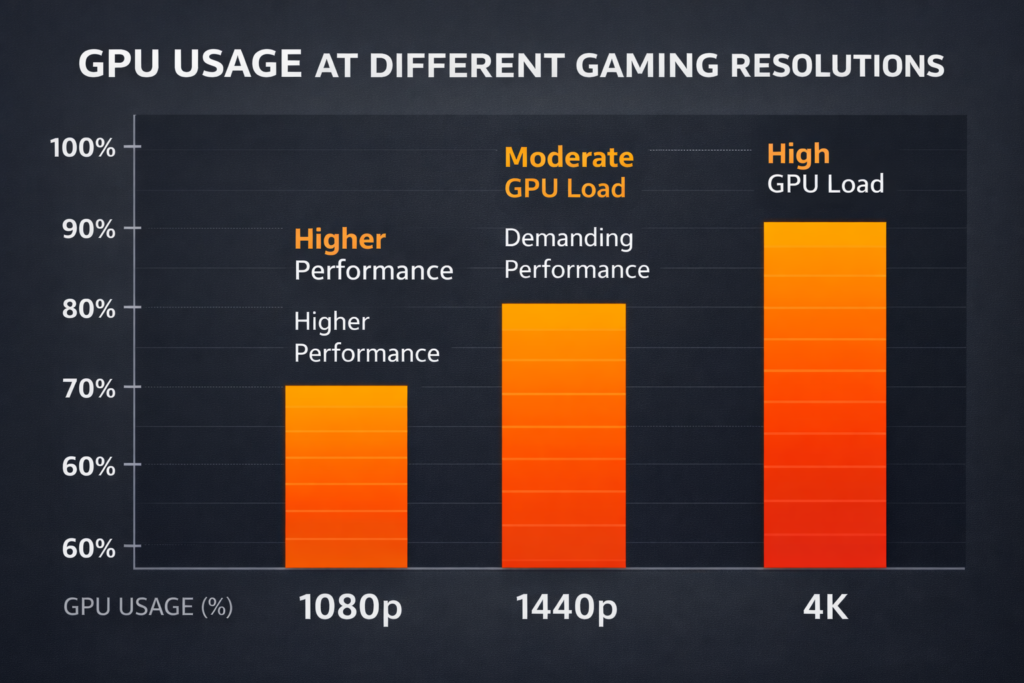
Screen resolution greatly affects GPU workload.
1080p requires fewer pixels to render, so GPU usage may remain lower.
1440p increases the number of pixels significantly.
4K resolution contains four times the pixels of 1080p, which can push GPUs to maximum utilization.
Higher resolution requires more graphical calculations, which increases GPU load.
Ray Tracing and GPU Load Impact:
Ray tracing simulates realistic lighting, reflections, and shadows. These calculations require advanced processing power.
When ray tracing is enabled, GPU usage often increases dramatically. Many GPUs reach full utilization when this feature is active because the rendering workload becomes much heavier.
Normal GPU Usage at Idle:
When your system is idle, GPU usage should remain very low. Most computers show values between 0 and 5 percent while sitting on the desktop.
Small background processes may occasionally increase usage slightly, but high idle usage can indicate unnecessary background programs.
GPU Usage on Desktop:
Basic desktop tasks such as browsing files or writing documents require minimal graphical processing. If GPU usage remains above 20 percent without running demanding software, a background application may be using resources.
GPU Usage with Browser Open:
Modern browsers use hardware acceleration to improve video playback and webpage rendering.
Watching online videos or opening multiple tabs may increase GPU usage to around 10 to 30 percent. This behavior is normal.
Background Apps Using GPU:
Several background programs may consume GPU resources without the user noticing.
Examples include:
- Screen recording tools
- Wallpaper animation software
- Streaming applications
- Video editing previews
Checking the Task Manager can help identify these processes.
Why Is My GPU Usage So High?
High GPU usage usually occurs when the graphics card processes demanding workloads. This often happens during gaming, video editing, or 3D rendering.
High Settings and Resolution:
Increasing graphics settings improves visual quality but also increases processing demand. Features such as high texture quality, advanced shadows, and detailed lighting require more GPU power.
Higher screen resolution also increases the number of pixels rendered in each frame.
CPU Bottleneck vs GPU Bottleneck:
System performance depends on how well components work together.
If GPU usage remains high while CPU usage stays moderate, the system is GPU-bound. This situation is common in modern games.
If CPU usage reaches its maximum while GPU usage remains low, the processor is limiting performance.
Frame Rate Limiters and V Sync:
Frame rate limits intentionally restrict the number of frames produced per second.
For example, if you set a 60 FPS limit, the GPU stops rendering extra frames once the limit is reached. This reduces GPU workload and power consumption.
Driver or Software Issues:
Outdated drivers can cause unusual performance behavior, such as spikes or poor GPU utilization. Updating drivers ensures proper compatibility with modern software.
Why Is My GPU Usage Low?
Low GPU usage can reduce performance if you expect higher frame rates.
CPU Bottleneck Issues:
If the CPU cannot process game logic fast enough, the GPU must wait for instructions. This delay lowers GPU utilization.
FPS Cap Limiting GPU Load:
When frame rate limits are enabled, the GPU does not need to render additional frames. This keeps utilization lower even during gameplay.
Power Saving Mode:
Some laptops reduce GPU power to save battery life. Switching to high-performance mode allows the graphics card to operate at full capability.
Outdated Drivers:
Old drivers can prevent the GPU from using its full performance potential.
Is High GPU Usage Dangerous?
High GPU usage alone does not damage hardware. Temperature and airflow play a much more important role in long-term reliability.
Safe GPU Temperature Range:
Most GPUs operate between 60 and 85 degrees Celsius during heavy workloads.
Maintaining good airflow inside the computer case helps keep temperatures stable.
Cooling plays a huge role in keeping GPU temperatures stable. If you notice your fans stopping sometimes, you may wonder whether should GPU fans should always spin.
Thermal Throttling Explained:
If the temperature rises too high, the GPU automatically reduces its clock speed to lower heat production. This protection mechanism prevents hardware damage.
Can 100% GPU Usage Damage It?
No, running at full load is part of normal GPU operation. As long as cooling works properly and temperatures remain stable, the graphics card can sustain high utilization safely.
GPU Usage in Different Scenarios:
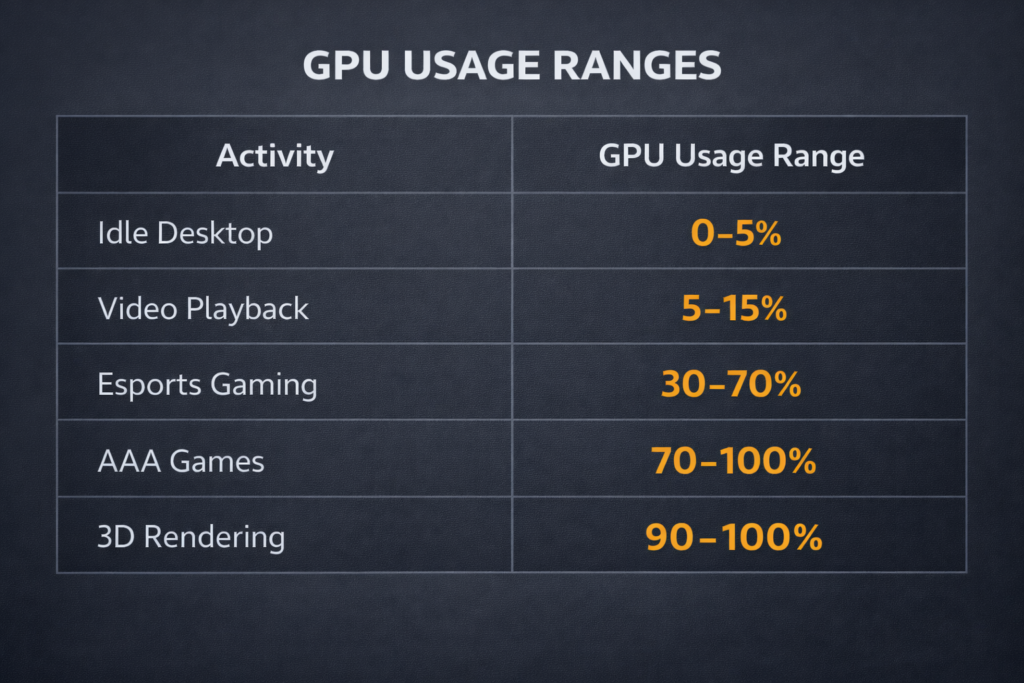
Different tasks place different demands on the GPU.
GPU Usage for Video Editing:
Editing high-resolution video may use 30 to 60 percent of GPU power. Applying complex visual effects or exporting video can increase usage above 80 percent.
Some professional software depends more on the processor than the graphics card. For example, many users ask if AutoCAD is CPU or GPU intensive.
GPU Usage While Streaming:
Streaming software sometimes uses GPU encoding to process video in real time. This can increase utilization by around 10 to 30 percent.
GPU Usage in Blender Rendering:
3D rendering tasks require massive computational power. GPUs often operate near 100 percent utilization while rendering scenes in applications such as Blender.
GPU Usage in AI Workloads:
Artificial intelligence tasks such as image generation or machine learning rely heavily on GPU acceleration. These processes can maintain full GPU utilization for extended periods.
How to Fix Abnormal GPU Usage?
If your GPU behaves unusually, follow these practical steps.
Check Task Manager:
Open Task Manager and identify which program is consuming GPU resources.
Update GPU Drivers:
Download the latest driver from the manufacturer’s official website. Updated drivers often improve performance and stability.
Adjust In-Game Settings:
Reducing resolution, shadows, and anti-aliasing can lower GPU load and improve frame rates.
Close Background Programs:
Closing unnecessary programs frees system resources and allows the GPU to focus on important tasks.
Monitor with MSI Afterburner:
Monitoring software helps track temperature, utilization, and clock speeds in real time. This information helps diagnose performance problems.
Ideal GPU Usage by Scenario Quick Table
| Scenario | Normal GPU Usage |
| Idle desktop | 0 to 5 percent |
| Watching videos | 5 to 20 percent |
| Esports games | 70 to 100 percent |
| AAA games | 90 to 100 percent |
| Video rendering | 60 to 100 percent |
| 3D rendering | 95 to 100 percent |
FAQ’s:
Is 100% GPU Usage Normal While Gaming?
Yes, 100% GPU usage during gaming usually means your graphics card is fully utilized and delivering maximum performance.
Should GPU Usage Always Be High?
No, GPU usage depends on the task; light activities like browsing or watching videos use much less GPU power.
Is Low GPU Usage a Problem?
Yes, sometimes. If FPS is low while GPU usage stays low, a CPU bottleneck or software issue may limit performance.
What Is Normal GPU Usage at Idle?
Normal GPU usage at idle is usually 0 to 5 percent when no heavy applications or graphics tasks are running.
Why Does GPU Usage Change During Different Tasks?
GPU usage changes based on workload. Games, rendering, and AI tasks require more graphics processing, so utilization increases.
Conclusion:
Understanding how much GPU usage is normal depends on what you are doing on your computer. Light tasks usually keep usage very low, while gaming, rendering, and heavy graphics work can push it close to 100 percent. As long as temperatures remain within safe limits, higher usage simply means your GPU is working efficiently and delivering its full performance.