
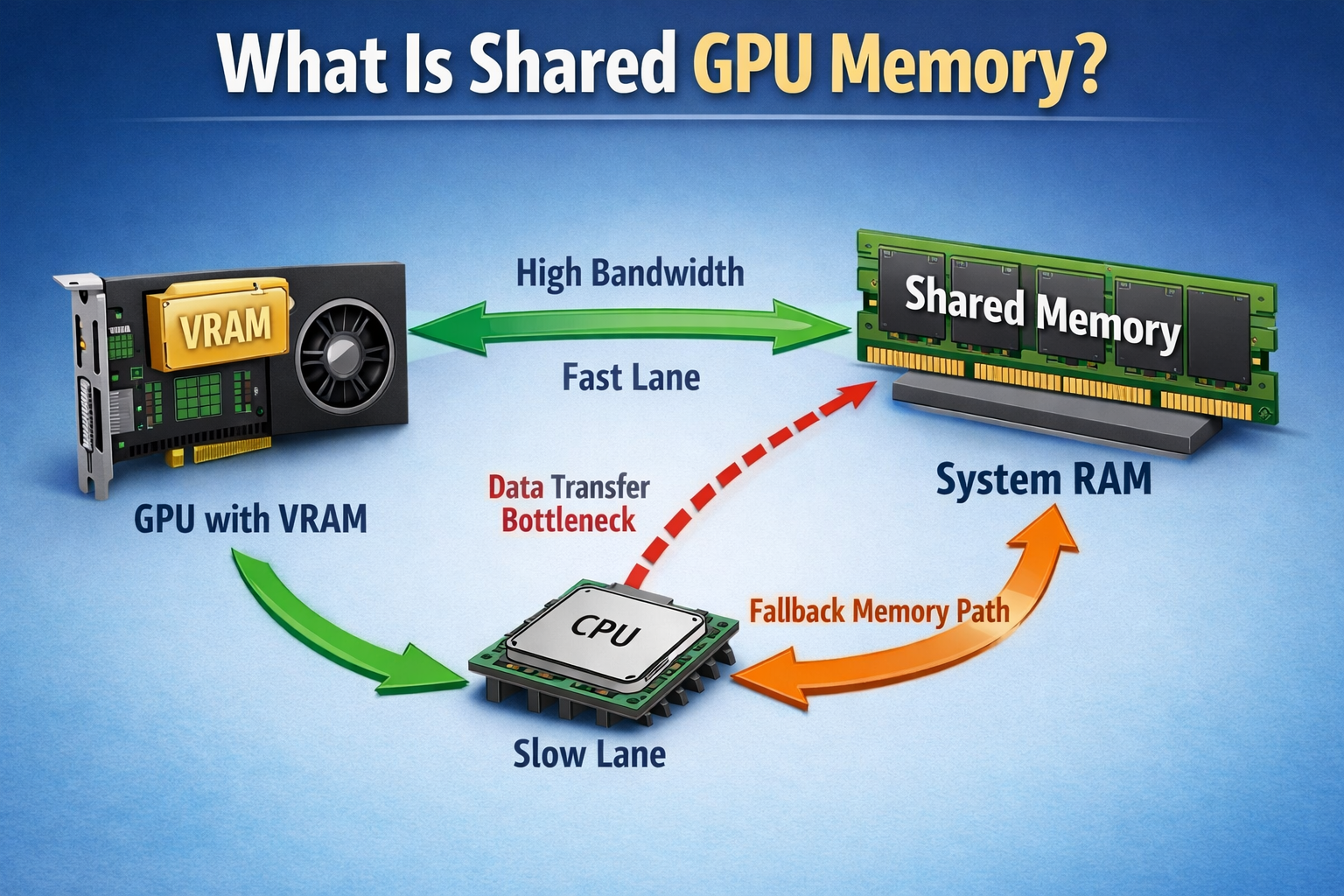
Shared GPU memory is a portion of system RAM that your GPU uses when its own memory (VRAM) is full. It acts as a backup to keep tasks running, but it is slower, which can reduce performance in heavy graphics workloads. This is the hidden reason your game suddenly drops from smooth to laggy, even when your settings look fine.
In this guide, you will understand what it means, how it works, and when it actually matters for performance.
What is shared GPU memory in simple terms?
Shared GPU memory is part of your system RAM that the GPU can borrow when it runs out of its own memory (VRAM).
Think of it like a backup space. When your graphics card is full, it uses regular RAM to keep things running. This helps avoid crashes, but it is slower than dedicated GPU memory.
How does shared GPU memory actually work?
When your GPU needs more memory, the system automatically allocates RAM to it. This process is managed by the operating system, especially Windows, using dynamic allocation.
This is where most users misunderstand performance: shared GPU memory does not act like extra VRAM; it introduces a data transfer bottleneck that slows everything down under load.
For example, if a game needs more texture memory, the GPU temporarily pulls data from system RAM. This works fine for small tasks, but heavy workloads can slow down because RAM is not built for graphics speed.
Expert Insight: According to system-level behavior in Windows 10 and 11, shared GPU memory is dynamically allocated and can reach up to half of total RAM, but it is only used when dedicated VRAM is fully occupied.
What is the difference between dedicated and shared GPU memory?
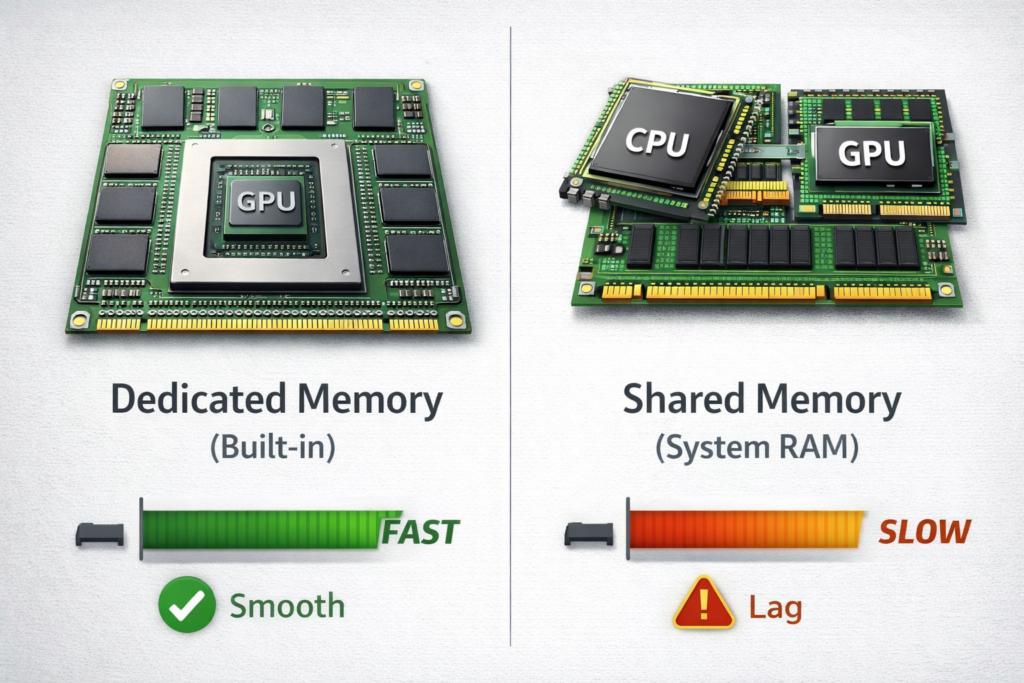
Dedicated and shared GPU memory serve different roles. One is built for performance, the other acts as backup when needed.
| Feature | Dedicated GPU Memory (VRAM) | Shared GPU Memory |
| Source | Built into the GPU | Uses system RAM |
| Speed | Very fast (high bandwidth) | Slower (limited bandwidth) |
| Usage | Handles main graphics tasks | Used when VRAM is full |
| Control | Fixed amount | Dynamically allocated |
| Performance | Smooth and stable | Can cause lag under load |
Quick Insight:
VRAM handles heavy graphics smoothly, while shared memory only helps prevent crashes but relying on it reduces performance.
How much shared GPU memory is normal?
Most systems allow up to 50% of total RAM as shared GPU memory.
For example:
8GB RAM → 4GB shared
16GB RAM → 8GB shared
This does not mean it is always used. It is just the maximum available if needed. Actual usage depends on workload, like gaming or editing.
Why does Windows show shared GPU memory?
Windows shows shared GPU memory to indicate how much RAM your GPU can access if needed. It does not mean your GPU is always using it.
Key points:
- It is a maximum limit, not constant usage
- Managed automatically by the system
- Changes based on workload
This helps users understand the total available graphics memory.
According to Microsoft’s official documentation on GPU memory management, Windows dynamically allocates shared memory based on workload demands.
When does a GPU start using shared memory?
A GPU starts using shared memory only when its dedicated VRAM is full.
Common situations:
- High-resolution gaming
- Video editing or rendering
- Running multiple apps with graphics load
In light tasks like browsing or watching videos, shared memory is rarely used.
Is shared GPU memory slower than VRAM?
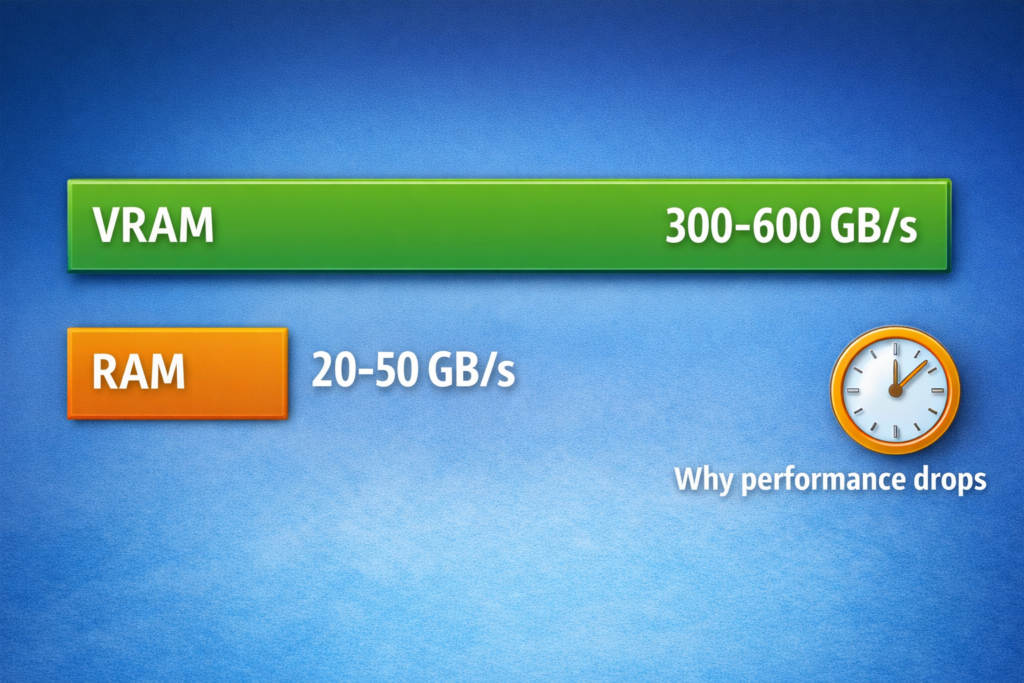
Yes, and the difference is huge.
VRAM speed: up to 300 to 600 GB/s
System RAM: around 20 to 50 GB/s
This gap exists because VRAM is designed for graphics processing, while RAM is general-purpose. That is why performance drops when shared memory is used heavily.
This happens because of bandwidth and latency limits. VRAM is directly connected to the GPU with high-speed memory lanes, while shared memory depends on slower system RAM and data transfer through the CPU, which creates a bottleneck.
Does shared GPU memory affect gaming performance?
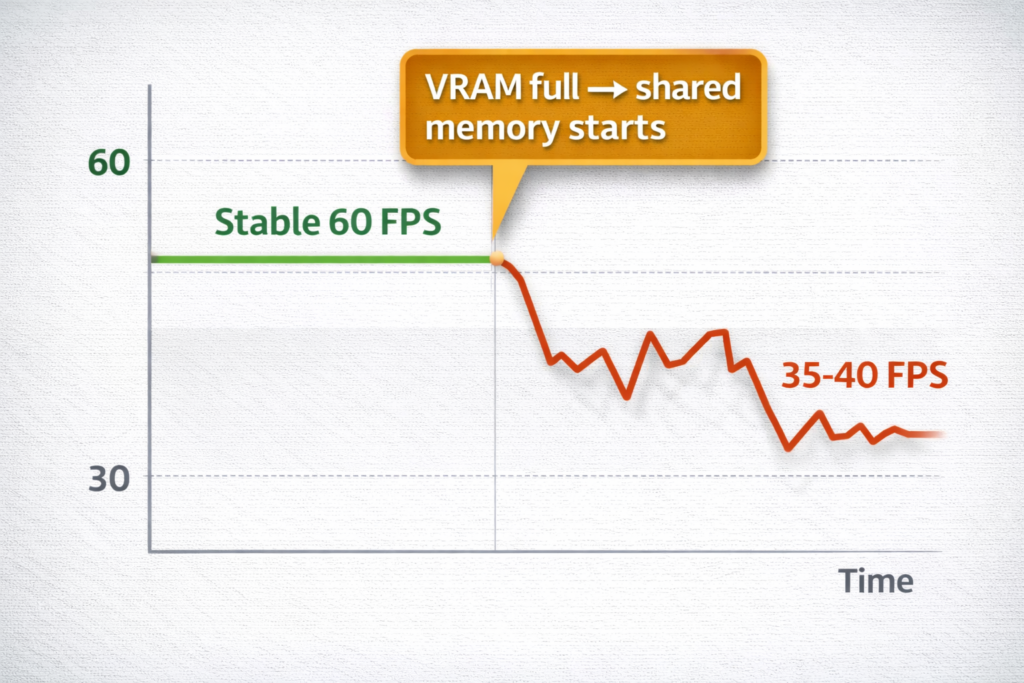
Yes, especially in demanding games.
If VRAM fills up, the system uses shared memory, which causes:
- FPS drops
- Stuttering
- Longer loading times
For example, a system with 4GB VRAM may struggle in modern games, forcing shared memory use and reducing smooth gameplay.
Real Example (Detailed):
On a system with a GTX 1650 (4GB VRAM) + 16GB RAM, running Warzone at 1080p medium settings, VRAM fills quickly.
Once shared memory is used, FPS can drop from 60 to 35 to 40, especially during explosions or crowded scenes.
The reason is simple: textures start moving between RAM and GPU, creating a bandwidth bottleneck.
Also Read: How Much GPU Usage Is Normal?
Does shared GPU memory impact video editing or rendering?
Yes, but it depends on workload size.
Light editing works fine, but heavy projects (4K video, 3D rendering) rely heavily on VRAM. When shared memory is used, rendering becomes slower and less stable.
This is why creators prefer GPUs with higher dedicated memory instead of relying on system RAM.
Is shared GPU memory good or bad?
Shared GPU memory is useful as a backup, but relying on it too much creates performance issues that most users notice as lag or stutter.
Good:
- Prevents crashes when VRAM is full
- Helps low-end systems run graphics tasks
Bad:
- Slower than VRAM
- Can reduce performance under heavy load
Treat it as a safety net, not a performance feature.
Can you increase shared GPU memory?
You cannot directly increase it manually in most systems. It is controlled by the operating system.
However, you can influence it:
- Increase system RAM (more RAM = more shared memory available)
- BIOS settings (limited control in some systems)
Still, this does not improve speed, only availability.
If your system feels fine one moment and suddenly stutters the next, shared GPU memory is often the silent cause.
What limits shared GPU memory performance?
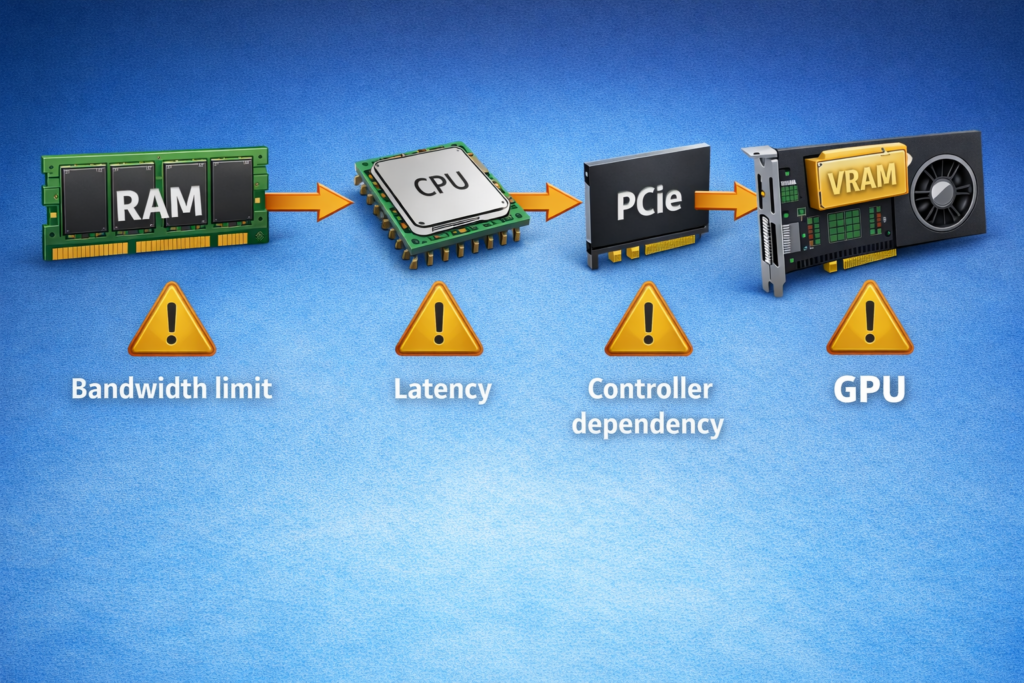
Main limiting factors:
- RAM speed (DDR4 vs DDR5)
- Memory bandwidth
- CPU and memory controller
- PCIe data transfer speed
Even with fast RAM, shared memory cannot match VRAM performance due to hardware limitations.
Newer DDR5 RAM improves shared memory performance slightly compared to DDR4, but it still cannot match dedicated VRAM in heavy graphics tasks.
All these factors affect system resource allocation, frame buffering, and how efficiently data moves between RAM and GPU.
Read Guide: What Does Overclocking a GPU Do?
When should you worry about shared GPU memory?
You should care only when performance issues appear.
Warning signs:
- Frequent FPS drops
- Stuttering in games
- Slow rendering times
If your system constantly relies on shared memory, it usually means your GPU does not have enough dedicated VRAM.
This is the point where most users get confused. If your game suddenly feels laggy even though settings are not maxed out, shared memory is usually the hidden reason.
Is shared GPU memory different for integrated vs dedicated GPUs?
Yes, and this is very important.
GPU Type
Memory Usage
Integrated GPU
Uses shared memory only
Dedicated GPU
Uses VRAM + shared memory (backup)
Integrated GPUs rely entirely on system RAM, which is why they perform worse on heavy tasks than dedicated GPUs.
So, what is shared GPU memory really about? It is a backup system that keeps your graphics running when VRAM runs out.
FAQs
Can shared GPU memory improve performance?
Yes, it helps prevent crashes, but it does not improve performance like real VRAM.
Is shared GPU memory useful for low-end systems?
Yes, it allows basic graphics tasks to run when dedicated memory is limited.
How much shared GPU memory is normal?
Most systems allow up to 50% of RAM, but actual usage depends on the workload.
Does shared GPU memory affect FPS in games?
It can reduce FPS when VRAM is full because RAM is slower than GPU memory.
Can shared GPU memory replace dedicated VRAM?
No, it cannot match the speed or performance of dedicated GPU memory.
Conclusion:
Shared GPU memory keeps your system running, but it quietly reduces performance when pushed too far.
If you are seeing FPS drops, stuttering, or slow rendering, the issue is not just low memory; it is how that memory is being used.
In simple terms:
VRAM = speed
Shared memory = survival
If your system depends on shared memory often, you are already hitting your hardware limits, and that is when upgrades start to matter.