
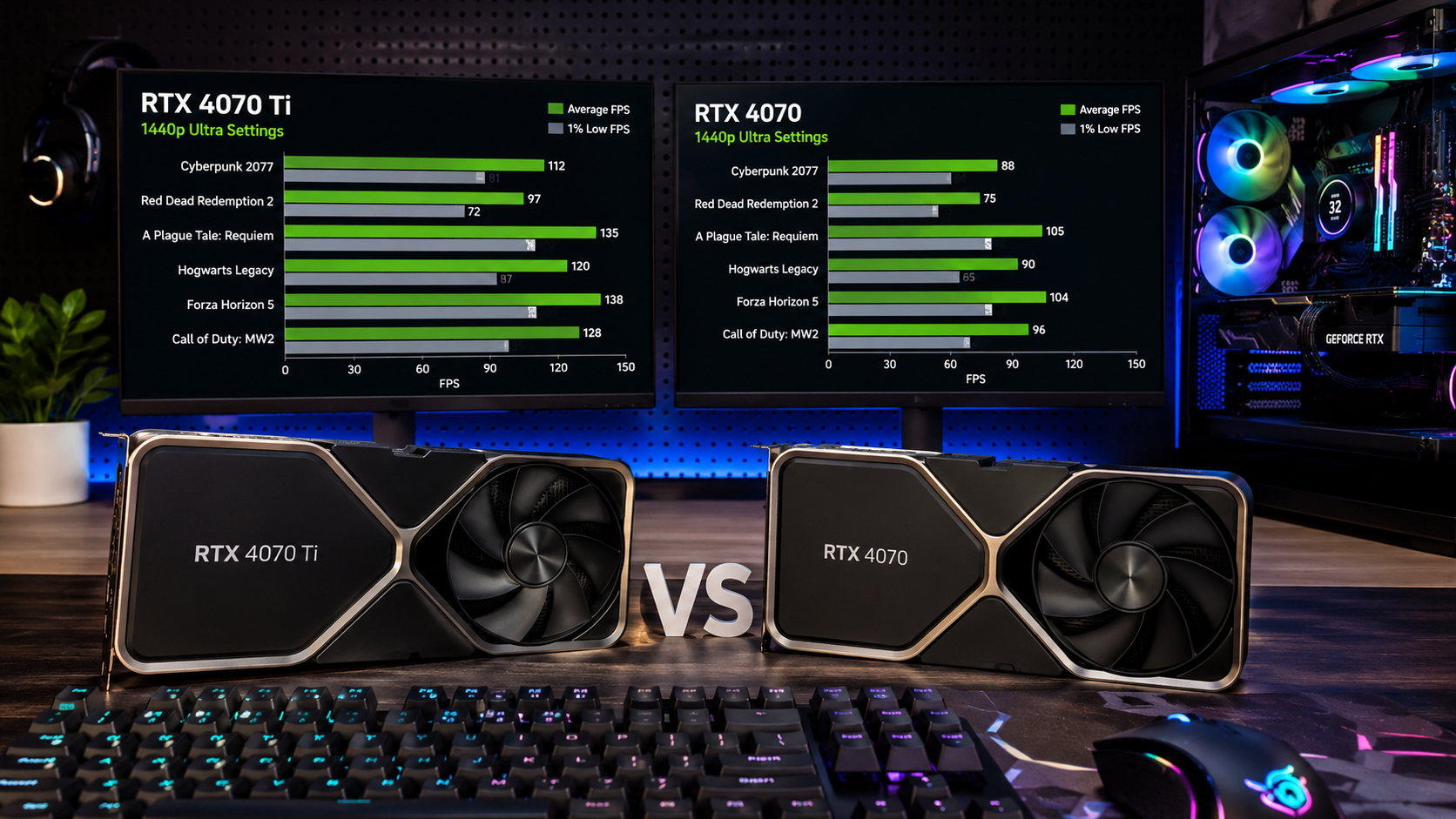
On NVIDIA graphics cards, Ti denotes a faster version of the same GPU model. A Ti card usually has more processing cores, higher performance, and better gaming or creative workloads than the non-Ti version, but it also costs more overall.
In this guide, we will explain what Ti means, how NVIDIA Ti and non-Ti GPUs compare, and whether paying extra for a Ti model is worth it for your needs.
Why NVIDIA Uses Ti Naming:
NVIDIA uses different labels, such as regular, Ti, and sometimes SUPER, to create distinct performance levels within the same GPU family.
The purpose is simple:
To give users multiple options based on budget and performance needs.
A regular GPU targets normal users.
A Ti GPU targets users who want more performance without jumping to a much higher price category.
Think of it like this:
A regular model is standard performance
A Ti model has enhanced performance
A higher-tier GPU is premium performance
Ti vs SUPER vs Non-Ti: Which One Should You Choose?
Many NVIDIA graphics cards come in regular, Ti, and SUPER versions. While all three belong to the same GPU family, they target different performance levels.
A regular GPU is designed for mainstream users who want solid gaming and everyday performance at a reasonable price.
A Ti GPU offers higher performance by including more CUDA cores, greater processing power, and often better gaming frame rates. It is aimed at users who want extra performance without moving to a completely different GPU tier.
A SUPER GPU typically sits between the regular and Ti versions or refreshes an existing model with improved specifications. Depending on the generation, a SUPER card can offer excellent value by delivering more performance for a relatively small price increase.
Before buying, compare benchmarks rather than relying only on the model name. In some cases, a SUPER card may provide better value than a Ti card.
Difference Between Ti and Non-Ti GPUs:
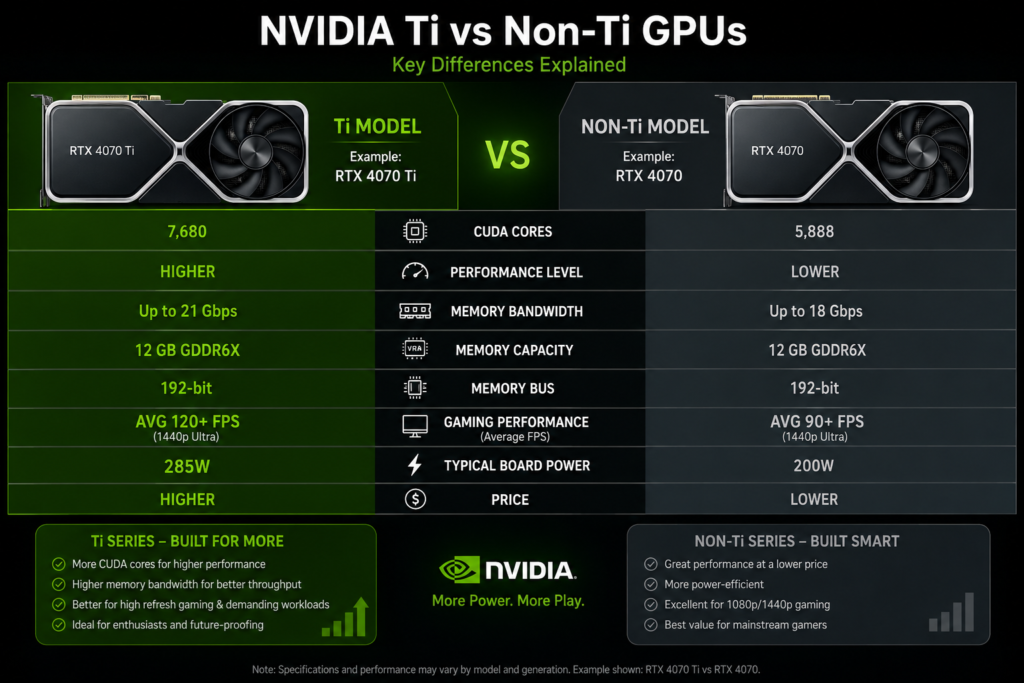
The main difference is the GPU’s internal hardware strength.
A Ti version usually has:
More processing cores
Higher performance speed
Better gaming FPS
Stronger memory performance in some cases
But it is not always a huge jump. Sometimes the difference is small, and sometimes it is very noticeable.
So the name alone is not enough. Specs matter more.
Performance in Gaming:
For gamers, the biggest difference is FPS, which means frames per second.
Higher FPS makes games feel smoother and more responsive.
A Ti GPU usually delivers better FPS compared to the non-Ti version in the same series.
This is especially helpful in:
Modern AAA games
High-resolution gaming
High refresh rate monitors
At 1080p resolution, both GPUs may perform well.
At 1440p or higher, Ti GPUs often show a clear advantage.
However, if your current GPU already meets your target FPS, upgrading to Ti may not be necessary.
If your graphics card is limiting gaming performance, our guide on What Does GPU Bound Mean explains how GPU bottlenecks affect frame rates.
Real-World Gaming Performance: How Much Faster Is a Ti GPU?
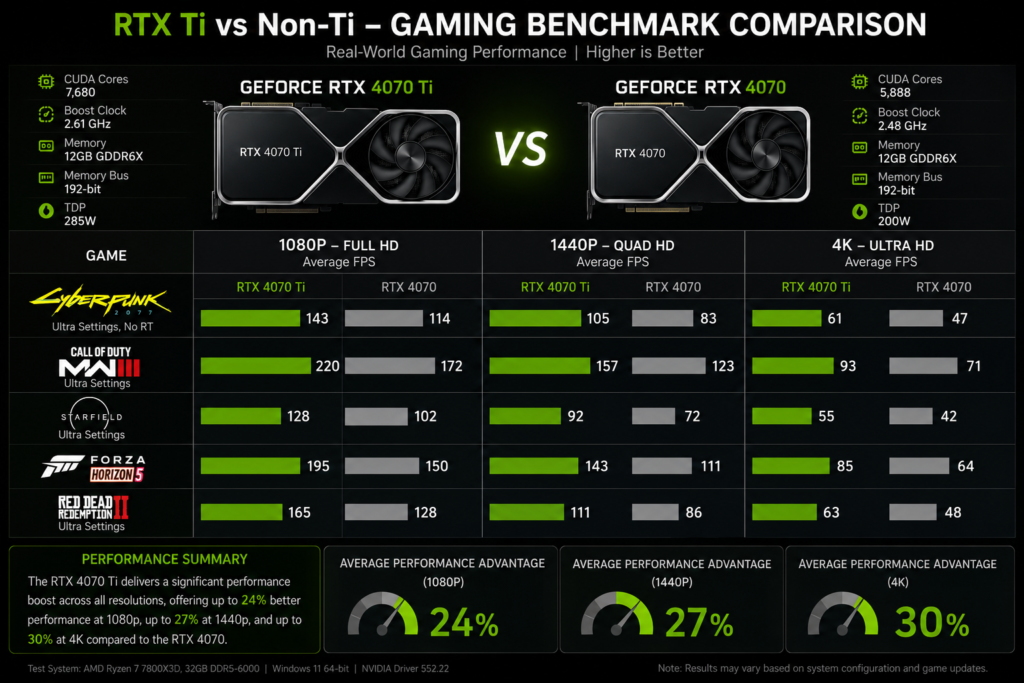
One of the most common questions buyers ask is whether the extra cost of a Ti graphics card translates into noticeable gaming performance.
In many NVIDIA generations, a Ti model delivers roughly 10% to 30% more gaming performance than its non-Ti counterpart. The exact difference depends on the game, resolution, graphics settings, and GPU generation.
For example, if a non-Ti card averages 80 FPS in a game, a Ti version might achieve around 90 to 105 FPS under the same conditions.
The performance gap becomes more noticeable when playing:
- AAA games with ultra settings
- 1440p gaming
- 4K gaming
- Ray-traced titles
- High-refresh-rate esports games
For casual 1080p gaming, the difference may feel smaller. However, gamers seeking smoother frame rates and longer-lasting performance often prefer Ti models.
Before buying, compare benchmark results and the official NVIDIA GPU specifications to understand the actual differences between Ti and non-Ti models.
VRAM and Memory Differences:
VRAM is memory used by the GPU to store textures, game data, and rendering information.
More VRAM helps in:
High-resolution gaming
Video editing
3D rendering
Large texture games
A common misconception is that Ti always means more VRAM.
This is not true.
Some Ti models have the same VRAM as the non-Ti version.
Some have more VRAM, and some do not.
So VRAM should always be checked separately.
CUDA Cores and Technical Power:
CUDA cores are small processing units inside NVIDIA GPUs that handle graphics tasks.
Generally:
More CUDA cores mean better performance
Ti versions often have more CUDA cores than non-Ti versions.
But performance also depends on:
Clock speed
Memory bandwidth
Cooling system
Power limit
So CUDA cores alone do not define full performance.
To better understand how graphics cards process and display pixels, you may also want to learn What Are ROPs in a GPU, since ROPs play an important role in overall graphics performance.
Ray Tracing and AI Features:
Modern NVIDIA GPUs support advanced features like:
Ray tracing for realistic lighting
DLSS for AI-based performance boost
AI tools for creators
Ti GPUs handle these features better because they have more raw power.
This makes them more suitable for:
Modern gaming
Content creation
Streaming
3D design work
Is Ti GPU Worth It:
The value of a Ti GPU depends on your use case and budget.
A Ti GPU is worth it when:
You want higher FPS at 1440p
You play demanding modern games
You use creative software
You want a longer GPU lifespan
A non-Ti GPU is better when:
You play casual or esports games
You use 1080p resolution
You want lower power usage
You want better budget value
The best choice depends on performance need versus price difference.
Price vs Performance Comparison:
Here is a simple comparison:
| Factor | Ti GPU | Non-Ti GPU |
| Performance | Higher | Standard |
| Price | Higher | Lower |
| Power Usage | Higher | Lower |
| Heat Output | Higher | Lower |
| Best For | Gaming and creators | Budget users |
| Value | Depends on the price gap | Strong in budget builds |
Always compare real-world benchmarks instead of only name labels.
Real Examples of NVIDIA GPUs:
RTX 3060 and RTX 3060 Ti:
RTX 3060 is designed for mainstream gaming
RTX 3060 Ti is faster and better for high settings gaming
The Ti version offers noticeably better performance in many games.
However, VRAM comparison may vary depending on model variants.
So performance is not the only factor.
RTX 4070 and RTX 4070 Ti:
RTX 4070 is efficient and strong for 1440p gaming
RTX 4070 Ti offers higher performance and more gaming headroom
The Ti version is better for demanding games and higher settings.
But it also consumes more power and costs more.
New Generation GPUs:
Newer NVIDIA cards continue to use Ti branding.
Each generation improves:
Performance
Efficiency
AI features
Memory speed
But naming alone does not guarantee the best value.
Always compare specifications and pricing before buying.
Common Mistakes Buyers Make:
Many users choose GPUs only based on name.
This leads to mistakes like:
Buying Ti when non-Ti is enough
Ignoring power supply requirements
Not checking VRAM size
Overpaying for a small performance gain
Not comparing benchmarks
Always check real-world performance, not just model name.
Simple Buying Guide:
Choose Ti GPU if:
You want strong gaming performance
You play heavy AAA games
You use high-resolution monitors
You want future-proof performance
Choose non Ti GPU if:
You are on a budget
You play light or esports games
You use 1080p gaming
You want better value for money
Expert Recommendation: Should You Buy a Ti GPU in 2026?
For most gamers, the best choice depends on the price difference between the Ti and non-Ti versions.
If the Ti model costs only a little more and offers significantly better performance, it is often the smarter long-term investment. The additional performance can help your system stay relevant for future games and software.
However, if the price gap is large, the non-Ti model may offer better overall value, especially for 1080p gaming, office work, and lighter creative tasks.
As a general rule:
- Choose a Ti GPU for demanding games, content creation, streaming, and 1440p or higher resolutions.
- Choose a non-Ti GPU if you want the best value for money and mainly play esports or casual games.
The smartest buyers compare benchmarks, VRAM, power consumption, cooling quality, and current pricing before making a final decision.
FAQ’s:
What does Ti mean in GPU?
Ti means a higher performance version of a standard NVIDIA graphics card.
Is Ti always better than non-Ti?
Yes, in performance, but not always in value.
Does Ti mean more VRAM?
Not always. VRAM depends on the specific model.
Is Ti good for gaming?
Yes, especially for 1440p and high settings gaming.
Does Ti use more power?
Yes, in most cases, because it has stronger hardware.
Conclusion:
Understanding what Ti means in GPU NVIDIA Ti vs Non Ti helps you choose the right graphics card for your budget and performance needs. A Ti model typically delivers better gaming and creative performance, while a non-Ti version offers solid value. The best choice depends on your workload and budget.