
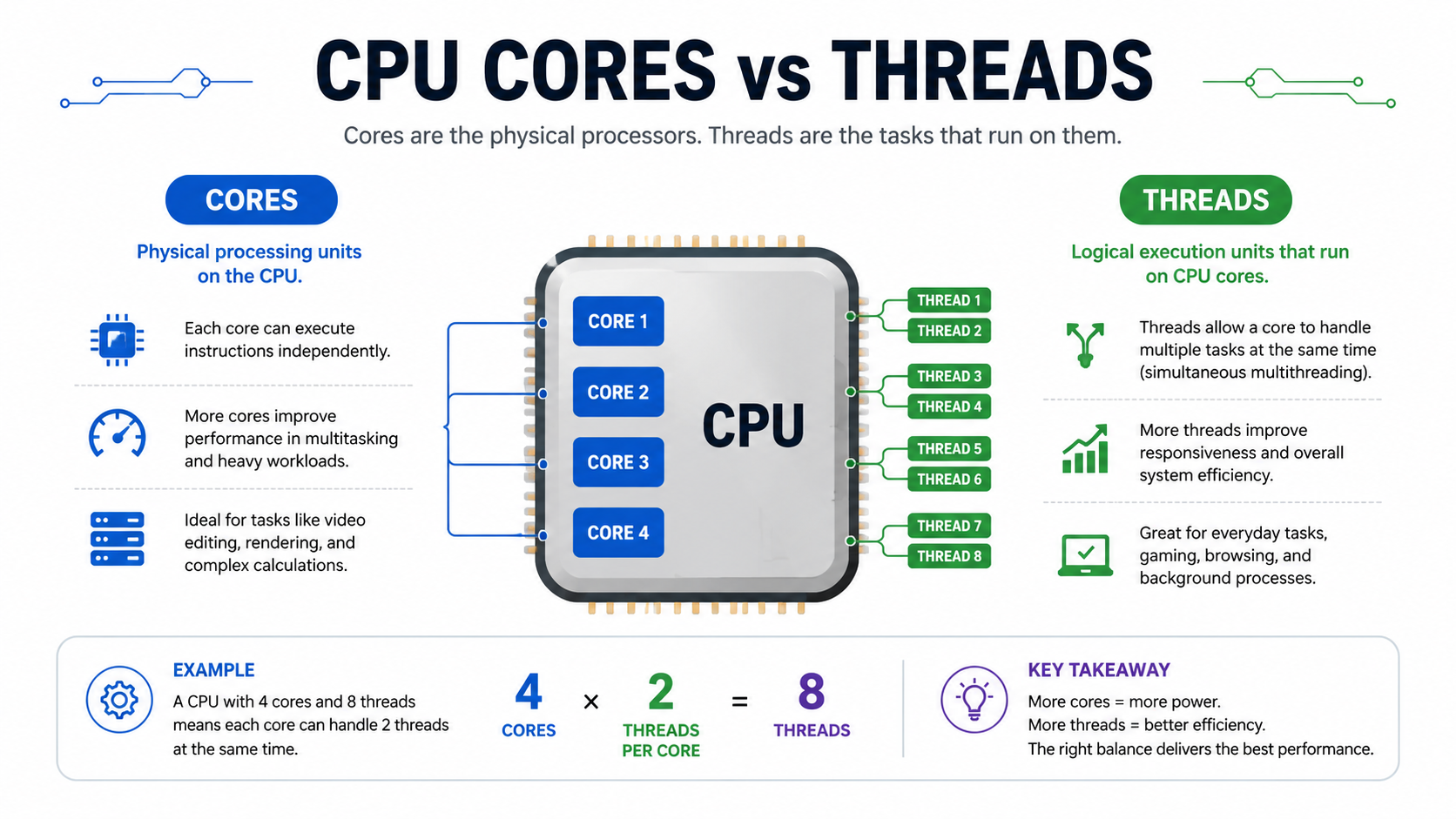
You can check your CPU threads by opening Task Manager on Windows, going to Performance CPU, and looking at Logical Processors. This number shows your CPU thread count. On Mac and Linux, you can check CPU details through System Information or terminal commands.
In this guide, you will learn what CPU threads are, the difference between cores and threads, and how to check your CPU threads on Windows, Mac, and Linux.
What Are CPU Threads?
CPU threads are virtual paths that allow a processor to do multiple tasks at once. Think of them as extra workers inside your CPU. Each thread can handle a different task, which helps your system run smoothly.
Definition of CPU Threads
CPU threads are the smallest sequence of programmed instructions that a processor can execute. In simple terms, a thread is like a worker inside your CPU that performs tasks.
When you ask, How many threads does my CPU have?, you’re really asking how many tasks your processor can handle at the same time.
Modern CPUs can run multiple threads simultaneously, making your system faster and more efficient.
Threads vs Processes
A process is a full program (like a browser), while a thread is a smaller part of that program.
- One process → multiple threads
- Threads share memory → faster execution
- Processes are independent → heavier on resources
Think of it this way:
Process = Restaurant
Threads = Waiters handling tasks
What Are CPU Cores?
CPU cores are the physical units inside your processor. Each core can work on its own task. A CPU with more cores can handle more work at the same time.
Physical vs Logical Cores
A CPU core is a physical unit inside the processor that executes instructions.
- Physical cores → actual hardware units
- Logical cores (threads) → virtual cores created via technology
Example:
| CPU Type | Cores | Threads |
| Basic CPU | 4 | 4 |
| Advanced CPU (Hyper-threading) | 4 | 8 |
Why Cores Matter
More cores mean:
- Better multitasking
- Faster rendering
- Improved gaming performance
However, cores alone don’t tell the full story; threads matter just as much.
Threads vs Cores: What’s the Difference?
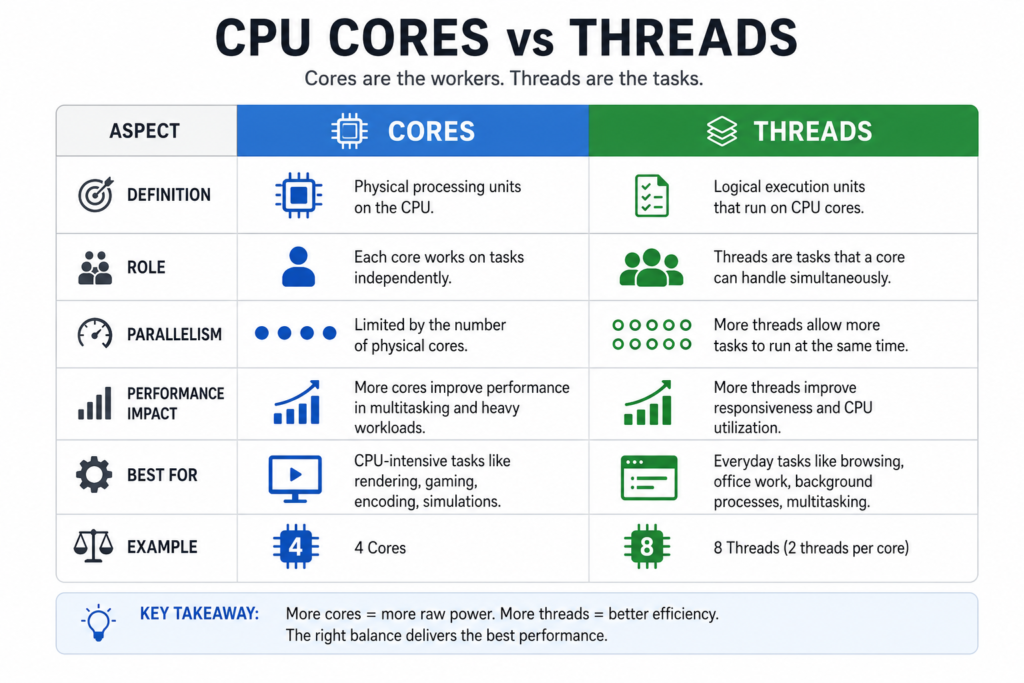
Cores are real hardware, while threads are virtual. One core can have more than one thread. For example, a 4-core CPU with hyper-threading can have 8 threads. This means it can handle more tasks without needing more physical cores.
Differences Explained
| Feature | Cores | Threads |
| Type | Physical | Virtual |
| Function | Execute tasks | Divide tasks |
| Performance | Raw power | Efficiency |
Real Example:
Imagine a kitchen:
- Cores = Chefs
- Threads = Hands of chefs
More chefs (cores) = more cooking
More hands (threads) = faster preparation
What Do CPU Threads Do?
CPU threads allow your computer to run multiple programs at once. For example, you can play a game, listen to music, and browse the web at the same time. Threads help divide the workload so everything runs faster and smoother.
While threads help with multitasking, monitoring your processor usage can help you understand whether your CPU is under heavy load. Learn more about how much CPU usage is normal during different tasks.
Multitasking Benefits
Threads allow your CPU to:
- Run multiple apps at once
- Handle background tasks
- Improve responsiveness
For example, you can:
Watch videos
Download files
Play games
All at the same time.
Performance Optimization
Threads improve performance by:
- Reducing idle time
- Sharing workload efficiently
- Enhancing parallel processing
Why Do CPU Threads Matter?
Threads improve performance, especially in multitasking. They are very useful for tasks like video editing, streaming, and gaming. More threads mean your system can handle more work without slowing down.
However, higher workloads can increase heat output, so it is important to monitor your processor temperature. You can learn how to monitor CPU temperature to keep your system running safely.
Gaming Performance
Modern games rely heavily on threads.
- 4 to 6 threads → basic gaming
- 8+ threads → smooth performance
- 12+ threads → high-end gaming
Different games use CPU and GPU resources differently. For example, Minecraft performance depends heavily on processor capability, which you can explore in our guide about whether Minecraft is CPU or GPU intensive.
Productivity Tasks
Threads are essential for:
- Video editing
- 3D rendering
- Programming
- Streaming
More threads = faster results.
Many professional applications depend on CPU performance, including design and engineering software. For example, you can learn whether AutoCAD is CPU or GPU intensive before upgrading your hardware.
What Is Hyper-Threading?
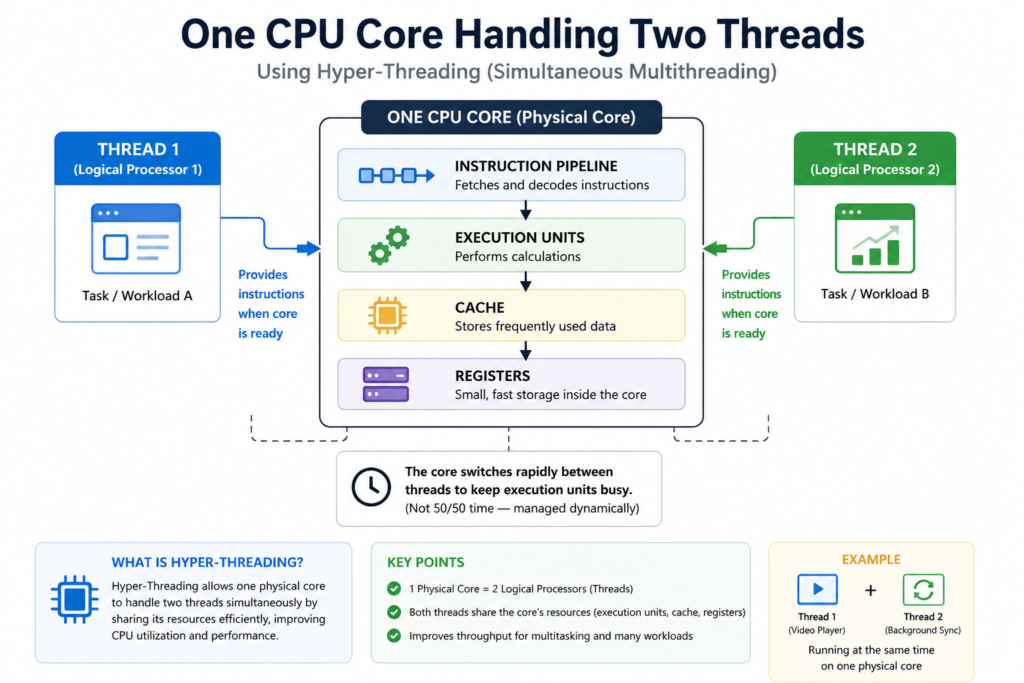
Hyper-threading is a technology that allows one CPU core to act like two threads. This improves efficiency and helps the CPU handle more tasks at once without adding extra cores.
Advantages and Limitations
Advantages:
- Better multitasking
- Increased efficiency
- Improved CPU utilization
Limitations:
- Not equal to real cores
- Performance gains vary
What Are Logical Processors?
Logical processors are another name for threads. When you check your CPU details, the number of logical processors shows how many threads your CPU has.
How Do CPU Threads Work?
Scheduling and Execution
The operating system assigns tasks to threads using a scheduler.
Steps:
- Task is created
- Assigned to a thread
- CPU executes it
- Results are returned
Threads work together to maximize performance.
When your CPU handles multiple threads, power consumption can change depending on workload. You can also learn how to check CPU power consumption in real time to analyze performance.
How to Check CPU Threads in Windows
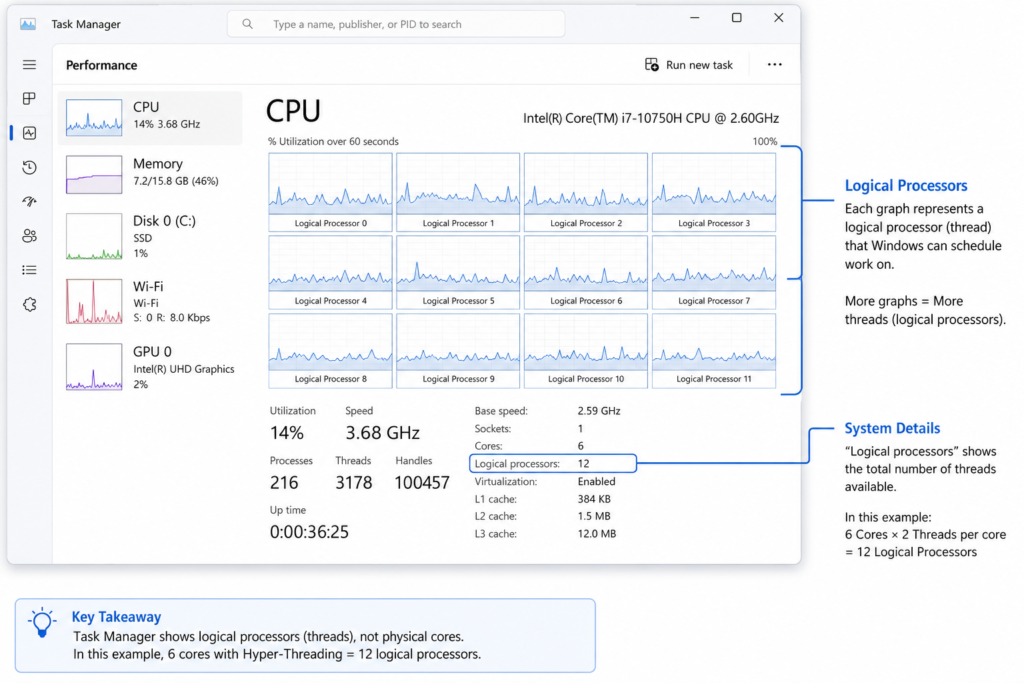
1. Task Manager
- Press Ctrl + Shift + Esc
- Go to the Performance tab
- Click CPU
- See Logical processors
2. System Information
- Press Windows + R
- Type msinfo32
- Check processor details
3. Command Prompt
wmic cpu get NumberOfLogicalProcessors
How to Check CPU Threads on Mac
Steps:
- Click Apple menu
- Select About This Mac
- Open System Report
- Check CPU details
How to Check CPU Threads on Linux
Open the terminal and type:
lscpu
This command will show detailed information about your CPU, including threads.
Can You Increase CPU Threads?
No, Threads depend on:
- CPU architecture
- Hardware design
However, you can:
Enable hyper-threading in BIOS
Upgrade your CPU
Ideal Number of Threads for Different Tasks
| Task | Recommended Threads |
| Basic use | 2–4 |
| Gaming | 6–12 |
| Streaming | 8–16 |
| Video editing | 12–32 |
Common Myths About CPU Threads
- More threads always mean better performance, but it’s not the reality.
- Threads = cores ❌
- Threads improve all applications equally ❌
Reality: It depends on software optimization.
Frequently Asked Questions
How do I check how many threads my CPU has?
Open Task Manager by pressing Ctrl + Shift + Esc, select the Performance tab, choose CPU, and look for Logical Processors. That number represents your CPU’s thread count.
How many CPU threads are enough for gaming?
For most gamers in 2026, 12 to 16 threads provide the best balance of gaming performance, multitasking, and future-proofing. Esports players can still enjoy excellent performance with 8 threads.
Can I increase the number of CPU threads?
No. Your processor’s hardware determines CPU threads. You can only enable existing threads through Hyper-Threading or SMT if your CPU supports them. Otherwise, upgrading the processor is the only way to increase thread count.
Why does Windows show fewer CPU threads?
The most common causes are:
- Hyper-Threading or SMT is disabled.
- An outdated BIOS.
- Incorrect BIOS settings.
- Temporary Windows hardware detection issues.
Are CPU cores and threads the same?
No. CPU cores are physical processing units, while CPU threads are virtual execution paths that improve multitasking by allowing each core to handle multiple workloads.
Do more CPU threads improve gaming performance?
Additional threads help modern games run more smoothly when multitasking or streaming, but they don’t automatically increase FPS. Clock speed, CPU architecture, and GPU performance also play major roles.
Which tool is best for checking CPU threads?
For most users, Task Manager is the quickest option. If you need detailed hardware information, CPU-Z and HWiNFO are excellent free alternatives.
What is the difference between Intel Hyper-Threading and AMD SMT?
Both technologies allow a single physical CPU core to process two threads simultaneously. Intel calls it Hyper-Threading, while AMD calls it Simultaneous Multithreading (SMT). Their purpose is essentially the same.
Tip: Always match your CPU threads with your workload. For gaming, focus on clock speed + threads, while for editing and streaming, higher thread counts matter more.
Conclusion
Understanding how many threads your CPU has is crucial for optimizing performance. Threads allow your processor to handle multiple tasks efficiently, improving everything from gaming to productivity.
While you can’t increase threads manually, choosing the right CPU with more threads can significantly boost your system’s power. Always balance cores and threads based on your needs, and you’ll get the best performance possible