
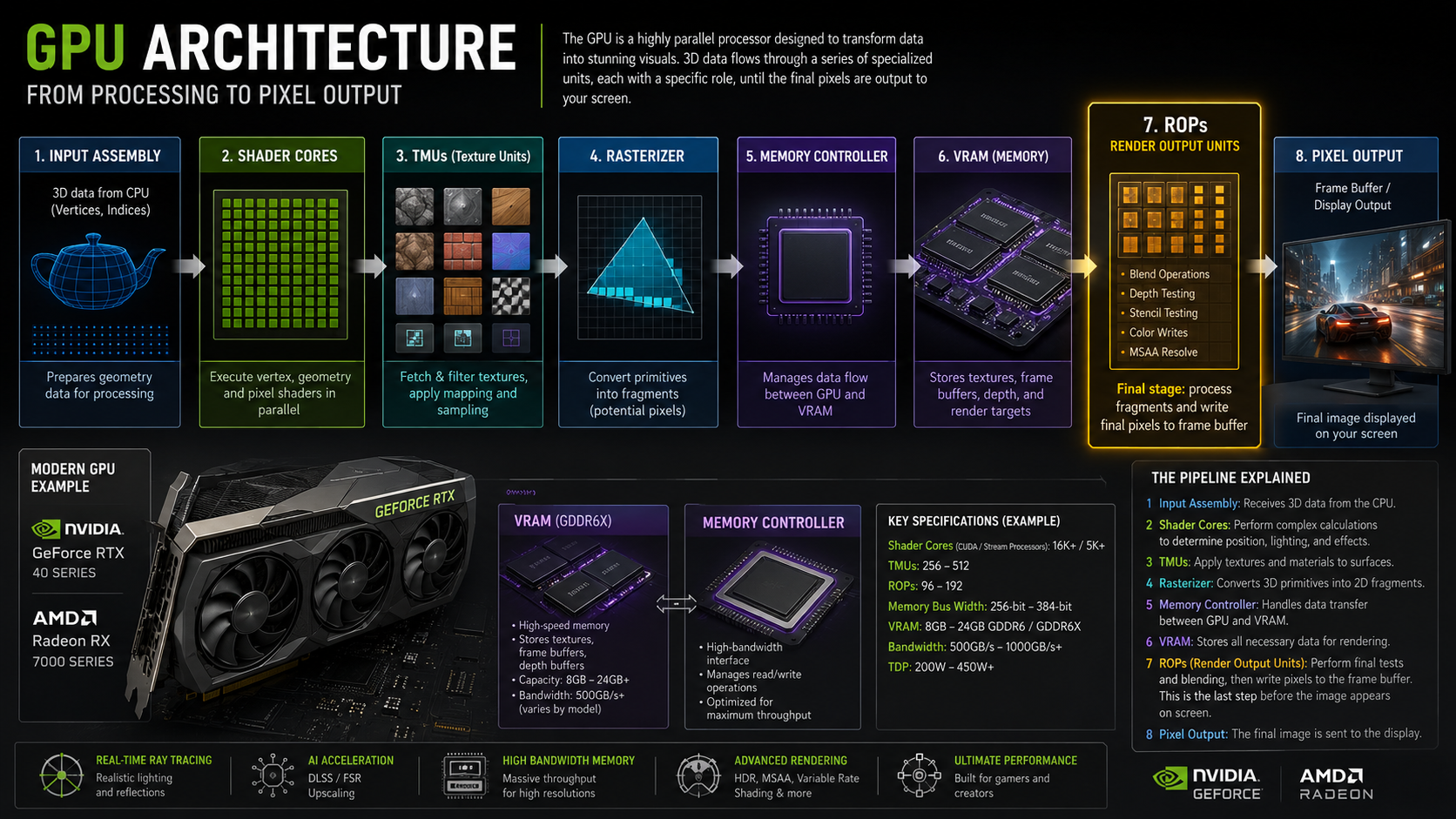
ROPs in GPUs are among the most overlooked graphics card specifications, yet they directly affect how quickly a GPU can render and display pixels on your screen. While gamers often focus on CUDA cores, VRAM, and clock speeds, Render Output Units (ROPs) can also influence performance, especially at higher resolutions and when anti-aliasing is enabled.
In simple terms, ROPs handle the final stage of rendering. They help blend colours, perform depth testing, apply certain anti-aliasing operations, and write completed pixels to the frame buffer. Without sufficient ROP performance, even a powerful GPU can struggle in pixel-heavy workloads.
This guide explains what ROPs are, how they work, whether they affect FPS, and why the recent RTX 50 Series missing-ROP issue has made them a major topic among PC gamers and hardware enthusiasts.
What Does ROP Mean in GPU?
ROP in a GPU usually means Render Output Unit. Some people also call it a Raster Operations unit because it handles work near the final stage of raster graphics rendering. In simple terms, ROPs help prepare the final pixels before they are sent to the display.
A GPU does many jobs at once. Shader cores compute effects, TMUs work with textures, and ROPs finalize the final image. They are not the most talked-about GPU components, but they are important for clean, smooth graphics output.
What Do ROPs Do in a Graphics Card?
ROPs handle the final pixel operations. They help decide what color each pixel should show, which pixels are visible, and how different image layers blend. This matters when games use shadows, lighting, reflections, smoke, glass, and other visual effects.
Think of the GPU like a factory. Shader cores build the product, texture units add details, and ROPs check and pack the final result. If the final packing stage is slow, the whole output can slow down in some situations.
Want to understand how all GPU components work together to render modern graphics? Read Them: NVIDIA GPU Architecture
How ROPs Work in the GPU Pipeline:
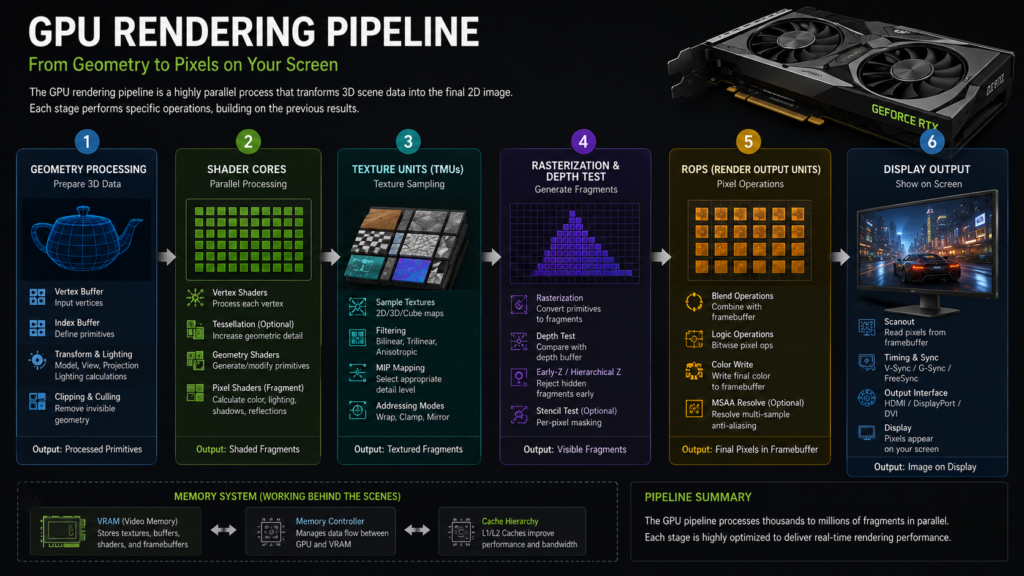
The GPU pipeline is the path graphics data follows before it becomes an image. First, the GPU processes shapes, textures, lighting, and effects. Near the end, ROPs perform final pixel work and prepare the result for the frame buffer.
This is why ROPs are linked with pixel output. They do not create every part of the scene, but they help complete the scene. If a game pushes many pixels at high resolution, ROPs can become more important.
Why ROPs Matter for Gaming:
ROPs matter because gaming is not only about raw compute power. A game must also draw pixels on the screen quickly. As resolution increases, the GPU must push more pixels per second, and ROPs help with the final output.
For normal gaming, ROPs are just one part of performance. You should not judge a GPU by ROP count alone. Still, when two graphics cards are close in power, ROP count can help explain differences in high-resolution or heavy anti-aliasing performance.
Want to know what happens when your graphics card becomes the performance limit in games? Now Read: What Does GPU Bound Mean?
ROPs and Pixel Fill Rate:
Imagine two graphics cards with similar shader performance, but one has a higher pixel fill rate due to a stronger ROP configuration. At 1080p, the FPS difference may be very small. However, at 4K resolution with MSAA enabled, the card with greater pixel output capacity can maintain smoother frame rates because it processes and writes more pixels each second.
This example shows why ROP count alone does not determine performance, but it can become a meaningful advantage in pixel-heavy workloads.
When ROPs Become a Performance Bottleneck:
In modern GPUs, shader performance is often the primary factor behind gaming FPS. However, there are situations where ROP performance becomes increasingly important.
A GPU is more likely to encounter a ROP bottleneck when:
- Gaming at 4K resolution
- Using high levels of MSAA
- Running ultra-high refresh rate displays
- Rendering scenes with heavy transparency effects
- Working with large frame buffers
This is why high-end graphics cards typically combine powerful shader cores with strong ROP throughput and memory bandwidth. A balanced design helps prevent one part of the graphics pipeline from limiting overall performance.
Do More ROPs Increase FPS?
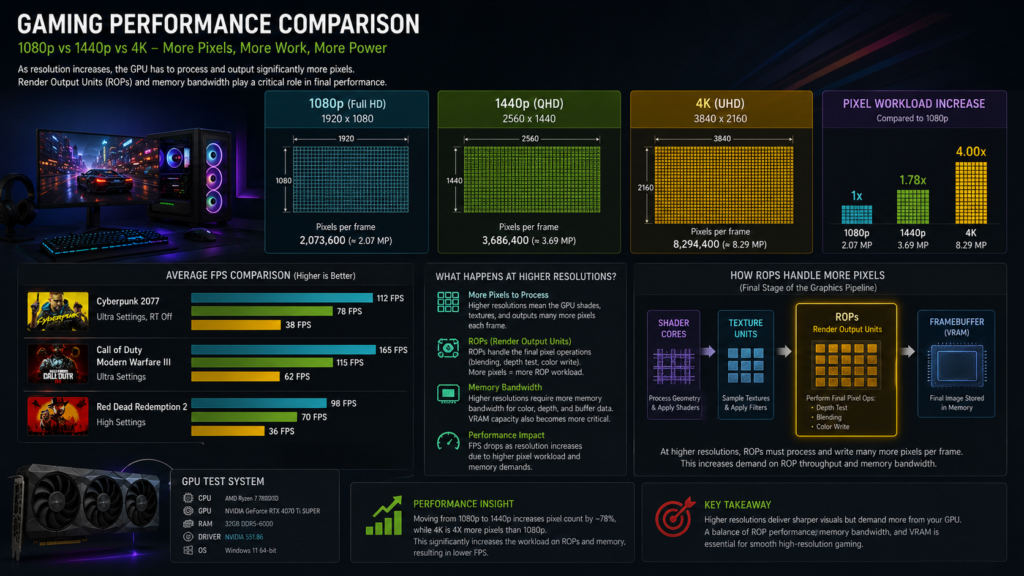
More ROPs can increase FPS in some cases, but not always. If a game is limited by pixel output, more ROPs may help. But if the game is limited by CPU, shaders, VRAM, or memory bandwidth, extra ROPs may not make much difference.
This is why GPU performance is not based on one number. A balanced graphics card needs strong cores, enough VRAM, good bandwidth, solid drivers, and enough ROPs. ROP count is useful, but it should be checked with the whole GPU spec sheet.
FPS depends on more than just one GPU specification. Also Read: What Does Overclocking a GPU Do?
ROPs at 1080p, 1440p, and 4K:
At 1080p, ROPs are usually less of a problem because the GPU is not pushing as many pixels. Many games at 1080p are limited more by CPU speed, game engine design, or shader performance than by final pixel output.
At 1440p and 4K, ROPs can matter more. The GPU has to finish many more pixels per frame. In these cases, weak ROP output, limited memory bandwidth, or heavy visual settings can more clearly reduce performance.
ROPs vs TMUs:
TMUs are Texture Mapping Units. Their job is to help apply textures to objects. Textures are the surface details you see on walls, roads, clothes, weapons, and characters. TMUs help make these surfaces look detailed and sharp.
ROPs are different. They work closer to the final output stage. TMUs help with texture detail, while ROPs help with final pixel operations. Both are important, but they do different jobs inside the graphics card.
ROPs vs CUDA Cores:
CUDA cores are NVIDIA processing cores used for many parallel tasks. They help with shading, lighting, computation work, and many game calculations. In AMD cards, similar work is handled by stream processors or shader units.
ROPs do not replace CUDA cores. They handle a different part of rendering. CUDA cores handle much of the heavy computation, while ROPs help finalize and output the pixels. A strong GPU needs both compute power and good output performance.
ROPs vs Shader Cores:
Shader cores create a large part of what you see in games. They process lighting, shadows, materials, effects, and many visual calculations. If a game uses complex shaders, shader power can be very important for FPS.
ROPs are more focused on final pixel handling. They help with color output, blending, depth testing, and writing pixels to memory. Shader cores build much of the visual scene, while ROPs help complete it.
ROPs vs Tensor Cores:
Tensor cores are specialized cores primarily used for AI-related work. In gaming, they are important for features like DLSS on NVIDIA cards. They are not designed to do the same job as ROPs.
ROPs are part of the traditional graphics output process. Tensor cores help with AI calculations, while ROPs help complete pixels. This is why missing ROPs can affect graphics performance but may not affect AI or compute tasks in the same way.
NVIDIA ROPs vs AMD Render Backends:
NVIDIA commonly lists ROPs in GPU specifications. AMD often uses the term Render Backends to refer to a similar area of the graphics pipeline. The names may differ, but the basic idea is close: they help complete the final pixel output.
When comparing NVIDIA and AMD GPUs, do not rely on a single number. Architecture, clock speed, cache, memory bandwidth, drivers, and game support all matter. ROPs and Render Backends are useful, but they are only one part of the full picture.
ROPs and Anti-Aliasing:
Anti-aliasing helps smooth rough edges in games. Some anti-aliasing methods create extra pixel work, and that can involve ROPs. Older methods like MSAA can place more pressure on the final pixel-output stage than some newer methods.
Modern games often use TAA, DLSS, FSR, or other smart image techniques. These can change how much pressure goes to ROPs. Still, ROPs remain important because the final image must be blended, checked, and written correctly.
ROPs and MSAA:
MSAA can increase the amount of sample work around the edges. This can make the image cleaner but also increase GPU pressure. ROPs may become more important when MSAA is used at high resolution.
ROPs and TAA:
TAA uses information from previous frames to smooth the image. It does not work exactly like MSAA, so the ROP load may differ. In many modern games, TAA depends more on the shader and post-processing work.
ROPs with DLSS and FSR:
DLSS and FSR use upscaling to improve performance while keeping image quality close to native resolution. These features can reduce some pixel workload, but the GPU still needs ROPs to finish and output the final frame.
ROPs and Memory Bandwidth:
ROPs often work closely with memory because final pixel data must be written to the frame buffer. If memory bandwidth is weak, the GPU may not move final image data fast enough. This can limit performance in some games.
This is why high-end GPUs usually have strong memory systems. More ROPs are useful only when the rest of the card can keep up. A GPU with many ROPs but weak bandwidth may still face limits.
Understanding how much memory your graphics card can access is equally important. What Is Shared GPU Memory?
Common ROP Bottlenecks:
A ROP bottleneck can happen when a game needs very high pixel output. This is more likely at 4K, with heavy anti-aliasing, high refresh rates, or demanding visual effects. The GPU may have enough shader power, but still struggles with final pixel work.
You may not always notice this bottleneck directly. It can appear as lower FPS, poor scaling at higher resolutions, or weaker performance when anti-aliasing is turned up. Good benchmarks can help reveal these limits.
RTX 50 Series Missing ROPs Issue:
The RTX 50 Series missing ROPs issue made many users pay attention to the ROP count. Some early graphics cards were reported to have fewer ROPs than expected. This matters because missing hardware units can reduce performance in graphics workloads.
This issue is important because it is not a typical driver bug. If physical ROP units are missing or disabled, software cannot simply add them back. That is why affected users should check their card and contact support if needed.
Which RTX 50 GPUs Have Missing ROPs?
Reports focused on some early RTX 5090, RTX 5090D, RTX 5080, and RTX 5070 Ti cards. The issue was described as rare, but it was still serious enough that users were told how to check their ROP count.
Not every card is affected. Most users may have the correct number of ROPs. Still, if you own one of these early RTX 50 cards, checking your ROP count is a smart step. It only takes a few minutes.
Correct ROP Counts for RTX 50 GPUs:
For desktop cards, the expected ROP counts are clear. RTX 5090 and RTX 5090D should show 176 ROPs. RTX 5080 should show 112 ROPs. RTX 5070 Ti should show 96 ROPs.
For laptop GPUs, the numbers are different. The RTX 5090 laptop GPU should show 112 ROPs. The RTX 5080 laptop GPU should show 96 ROPs. RTX 5070 Ti laptop GPU should show 80 ROPs.
RTX 5090 ROP Count:
The desktop RTX 5090 should show 176 ROPs. If a desktop RTX 5090 shows a lower value than this, the owner should check the card carefully and contact the board manufacturer or seller for support.
RTX 5090D ROP Count:
The desktop RTX 5090D should also show 176 ROPs. This is the same expected ROP count as the desktop RTX 5090. Users should confirm the number in GPU-Z.
RTX 5080 ROP Count:
The desktop RTX 5080 should show 112 ROPs. If it shows a lower number, that may indicate a missing ROP issue. The best next step is to contact the card maker.
RTX 5070 Ti ROP Count:
The desktop RTX 5070 Ti should show 96 ROPs. A lower count can indicate that the card does not match its expected specification. Keep proof and contact support for replacement guidance.
How to Check GPU ROP Count:
The easiest way to check the GPU ROP count is to use GPU-Z. It is a popular hardware information tool used by many PC builders, reviewers, and gamers. It shows key GPU details in one place.
After opening GPU-Z, look for the section labeled ROPs and TMUs. The ROP number should match the official specification for your graphics card. If the number is lower, take a screenshot before contacting support.
How to Check ROPs in GPU Z:
First, download and open GPU Z. Then, wait for the tool to detect your graphics card. On the main screen, find the ROPs/TMUs field. The first number usually shows the ROP count, while the second number shows TMUs.
For example, if your GPU should have 112 ROPs, the ROPs/TMUs field should start with 112. If it shows 104 instead, that may be a warning sign. Always compare your result with the correct model specification.
What to Do If ROPs Are Missing:
If your GPU has fewer ROPs than expected, do not panic. First, make sure you are checking the correct GPU model. Then update GPU Z and check again. If the number is still wrong, save a screenshot as proof.
After that, contact the board manufacturer, retailer, or official support channel. Explain the issue clearly and share the screenshot. Since this is a hardware specification problem, replacement or RMA support is usually the right path.
Can Missing ROPs Be Fixed?
Missing ROPs usually cannot be fixed by a normal driver update. A driver can improve performance or fix software bugs, but it cannot create physical hardware units that are not active on the chip.
This is why affected users should treat missing ROPs as a hardware specification issue. If the card does not match the expected ROP count, the safest step is to contact support and ask about replacement options.
Should You Return a GPU with Missing ROPs?
If your GPU has fewer ROPs than the official count, it’s reasonable to return or replace it. You paid for a card with specific hardware specs, so the product should match those specs.
Even if the performance loss is small in some games, it can still matter over time. A high-end GPU is expensive, and buyers should not accept missing hardware unless the seller clearly disclosed it and priced it fairly.
Do ROPs Matter for AI Workloads?
ROPs are not the main part used for AI workloads. AI work depends more on CUDA cores, Tensor cores, VRAM capacity, memory bandwidth, and software support. This is why missing ROPs may not affect AI tasks the same way they affect graphics tasks.
Still, many users buy gaming GPUs for mixed use. If you play games, edit content, and run AI tools, your card should meet its full hardware specification. A complete GPU is always better than one with missing units.
Do ROPs Matter for Video Editing?
ROPs are not usually the first spec to check for video editing. Video editing depends more on encoder support, VRAM, GPU acceleration, CPU power, RAM, and storage speed. Still, ROPs can help in real-time display and visual output tasks.
For most editors, a strong GPU with enough VRAM matters more than ROP count alone. But if a graphics card is missing ROPs, that is still a sign it does not fully match its advertised hardware.
Do ROPs Matter for 3D Rendering?
ROPs can matter in real-time 3D viewport work, especially when scenes are rendered at high resolution with heavy shading and visual effects. But the final 3D rendering often depends more on CUDA cores, RT cores, VRAM, and render engine support.
For Blender, Unreal Engine, CAD, or similar tools, you should look at the full GPU. ROPs help with display output, but they are not the only factor. Balanced performance matters more than one isolated number.
Should You Check ROPs Before Buying a GPU?
Yes, checking ROP count is a smart idea, especially if you are buying a used GPU or an early RTX 50 Series card. It only takes a short time and can save you from a bad purchase.
Before buying, check reviews, official specs, and seller details. After purchase, run GPU-Z and confirm the card matches its expected ROP count. This simple check gives you more confidence in your hardware.
Do ROPs Matter?
ROPs do matter, but they are not the only thing that makes a GPU fast. They are important for final pixel output, high-resolution gaming, anti-aliasing, and some rendering situations. A weak or missing ROP count can affect real performance.
When buying or checking a GPU, look at the full picture. Check ROPs, cores, VRAM, memory bandwidth, clock speed, cooling, drivers, and real game benchmarks. That is the expert way to judge a graphics card.
FAQ’s:
What are ROPs in a GPU?
ROPs are Render Output Units inside a graphics card. They help finish final pixel operations before the image appears on your screen. They are important for pixel output, blending, depth checks, and some anti-aliasing tasks.
What does ROP stand for?
ROP commonly stands for Render Output Unit. It is also linked with raster operations because it handles work near the final raster graphics output stage.
What is a Render Output Unit?
A Render Output Unit is a GPU part that helps prepare final pixels. It handles tasks such as color blending, depth testing, and writing pixel data to memory.
Do ROPs improve FPS?
ROPs can improve FPS when a game is limited by pixel output. But if the game is limited by CPU, shaders, VRAM, or memory bandwidth, more ROPs may not give a big FPS boost.
Are more ROPs always better?
More ROPs are useful, but they are not always better on their own. A GPU also needs strong cores, fast memory, good drivers, and enough VRAM to perform well.
Do ROPs matter for 4K gaming?
Yes, ROPs can matter more at 4K because the GPU must handle many more pixels. High-resolution gaming puts more pressure on the final pixel output and memory bandwidth.
Conclusion:
Yes, ROPs in GPUs do matter, especially for high-resolution gaming, anti-aliasing, and final pixel output. They are not the only specs to check, but they help complete the image you see on screen. Always compare ROPs with VRAM, memory bandwidth, cores, and real benchmarks.