
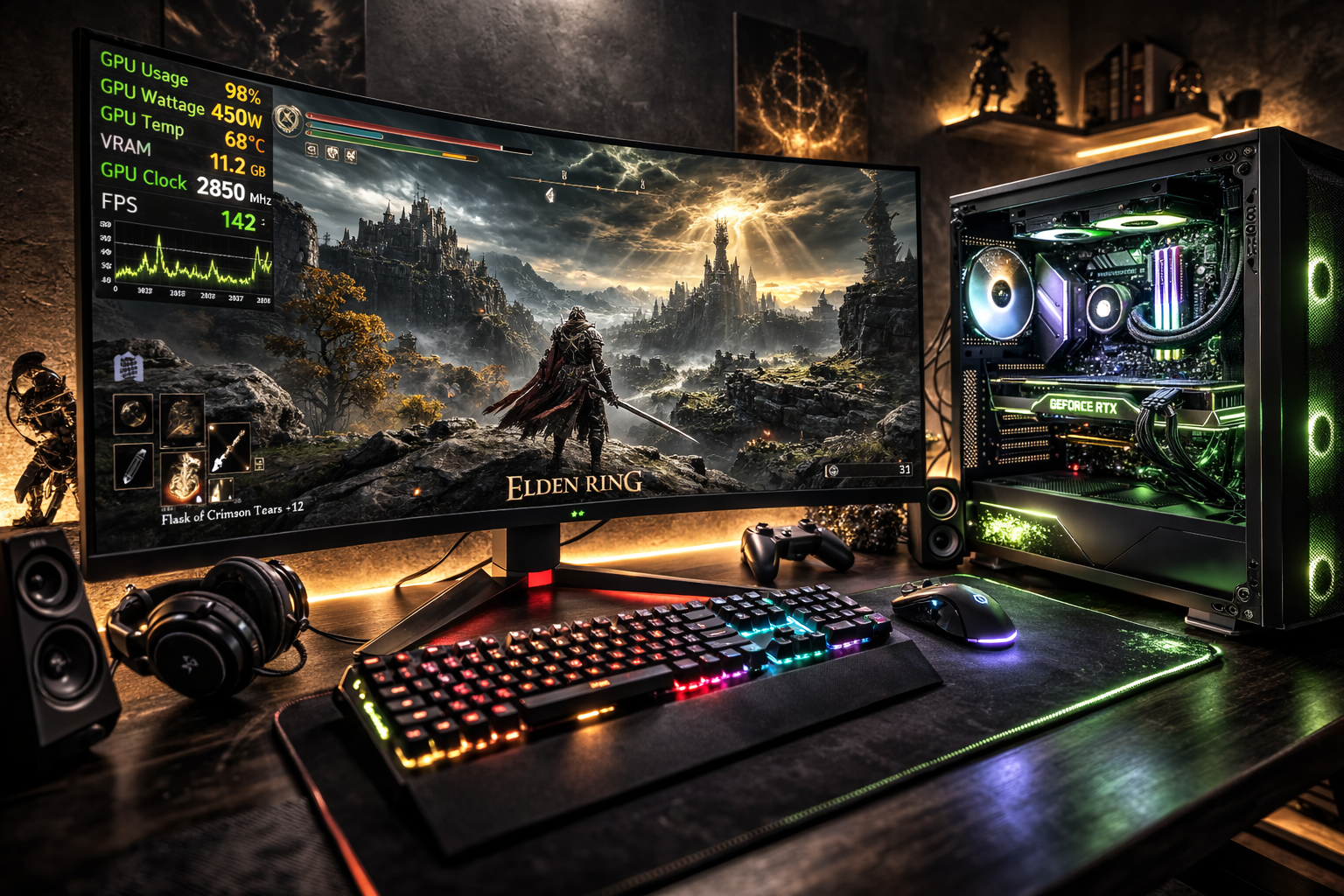
To increase GPU wattage in Elden Ring, remove the 60 FPS cap, increase graphics settings such as texture and effect quality, update your GPU drivers, and set your GPU to maximum performance mode. These changes increase the workload, allowing the graphics card to draw more power.
In this guide, we will explore simple steps that help players unlock better performance and get the most out of their gaming hardware.
Low GPU Usage in Elden Ring on PC:
Many PC players notice that their GPU usage stays low while playing Elden Ring. For example, your graphics card might only run at 40 to 60% utilization even while the game is running.
This can feel confusing, especially if you are using a powerful GPU.
Low GPU usage usually means the graphics card is waiting for another component in the system. In most cases, the CPU, graphics settings, frame-rate limits, or system configuration prevent the GPU from working at full capacity.
If you are unsure whether your GPU is actually underperforming, it helps to understand what normal GPU usage looks like during gaming.
Causes of Low GPU Usage in Elden Ring:
Why Does Elden Ring Have Low GPU Usage?
Low GPU usage happens when the game does not fully utilize the graphics card. This usually occurs when another part of the system becomes the limiting factor.
For example, if the CPU cannot process game data quickly enough, the GPU must wait before rendering new frames. Similarly, low graphics settings or frame-rate limits reduce the amount of work given to the GPU.
To diagnose this problem, players often use monitoring tools such as MSI Afterburner, which shows real-time GPU usage, temperature, clock speeds, and power draw while playing.
Why Is Elden Ring Not Using My GPU?
Sometimes the game runs on integrated graphics instead of a dedicated GPU. This situation is more common on laptops or systems that include both graphics options.
If Elden Ring launches on integrated graphics, performance will be significantly lower, and GPU usage may appear unusual.
You can fix this by assigning the game to your dedicated graphics card through your graphics control panel. After switching to the high-performance GPU, restart the game and check usage again.
Is Low GPU Usage Normal in Elden Ring?
Yes, in some situations, low GPU usage is completely normal.
Elden Ring was originally designed with a 60 FPS frame-rate limit. Once the system reaches that limit, the GPU no longer needs to work harder.
Because of this, GPU usage may stay lower even if your graphics card is capable of much higher performance.
If the game feels smooth and frame rates remain stable, low GPU usage is usually not a real problem.
Why Is GPU Usage Low on High-End PCs?
Even high-end PCs can show low GPU usage in Elden Ring. One of the most common reasons is a CPU bottleneck.
The game engine relies heavily on the CPU for tasks such as:
- AI calculations
- physics simulation
- world streaming
- background game logic
If the CPU reaches its limit, the GPU cannot receive rendering tasks quickly enough. As a result, the GPU remains partially idle.
Can a CPU Bottleneck Cause Low GPU Usage?
Yes. A CPU bottleneck is one of the most common causes of low GPU usage in modern games.
When the CPU cannot process game logic fast enough, the GPU must wait between frames. This often creates a pattern where CPU usage is very high while GPU usage remains relatively low.
Reducing CPU-intensive settings such as shadows, NPC density, or view distance can sometimes help balance the workload between the processor and the graphics card.
Does VRAM Limit GPU Usage in Elden Ring?
Yes, insufficient VRAM can affect performance.
When a GPU runs out of VRAM, the system begins moving textures between system memory and the graphics card. This process slows down rendering and can cause stuttering or inconsistent performance.
Lowering texture quality or using a GPU with more VRAM can help reduce this issue.
Why Is GPU Wattage Low in Elden Ring?
Low GPU wattage usually means the graphics card is not under heavy load.
This commonly happens when:
- The FPS cap is reached
- The graphics settings are too low
- The CPU limits performance
- Background tasks interrupt system resources
If wattage remains low while FPS stays stable, the system may simply not need additional power to run the game smoothly.
Why Does GPU Usage Drop in Elden Ring?
GPU usage can fluctuate during gameplay. This often happens when entering new areas, loading assets, or when the game shifts more workload to the CPU.
Background programs can also interrupt system resources. Even applications such as web browsers, screen recorders, or overlays may slightly reduce performance during gameplay.
Can DirectX Issues Cause Low GPU Usage?
Yes, Outdated or corrupted graphics components can reduce GPU performance.
DirectX is responsible for allowing games to communicate with graphics hardware. If graphics drivers or system components become outdated, the GPU may not operate efficiently.
Keeping Windows and graphics drivers updated usually resolves these issues.
Does Elden Ring Have a 60 FPS Limit?
Yes, Elden Ring was designed with a default 60 FPS cap on PC.
Once the game reaches this frame rate, the GPU no longer needs to work harder. As a result, GPU usage may remain lower than expected, especially on powerful systems.
How to Fix Low GPU Usage in Elden Ring?
How Do You Fix Low GPU Usage in Elden Ring?
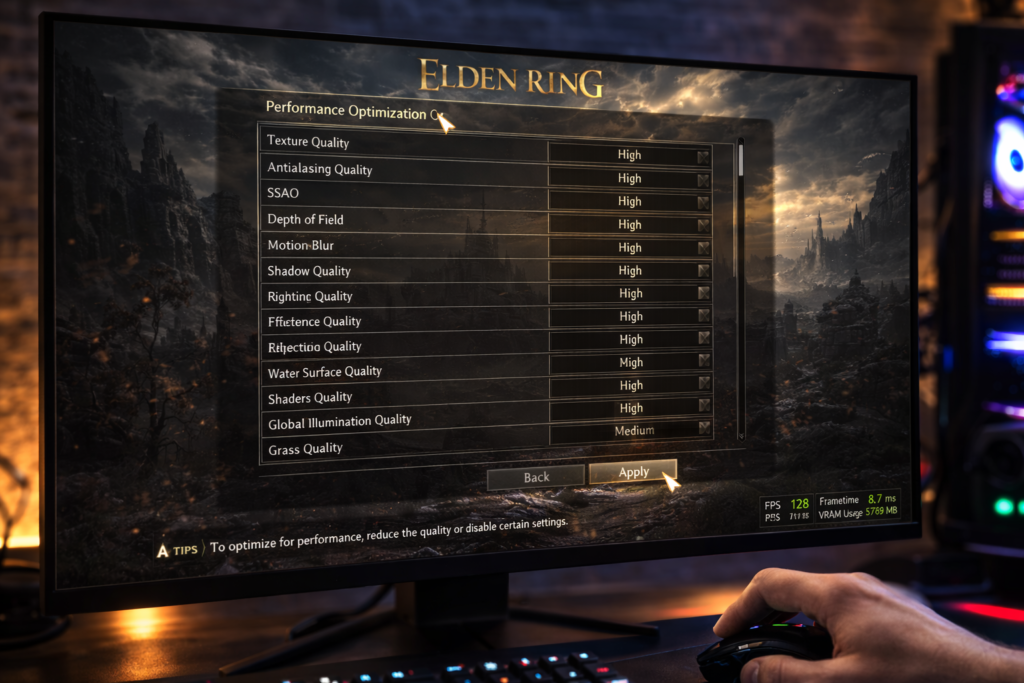
Several simple steps can improve GPU utilization:
- Update graphics drivers
- Ensure the game uses the dedicated GPU
- Increase graphics settings
- Close unnecessary background applications
- Monitor CPU usage during gameplay
In many cases, correcting system settings is enough to restore normal GPU performance.
How Do You Force Elden Ring to Use a Dedicated GPU?
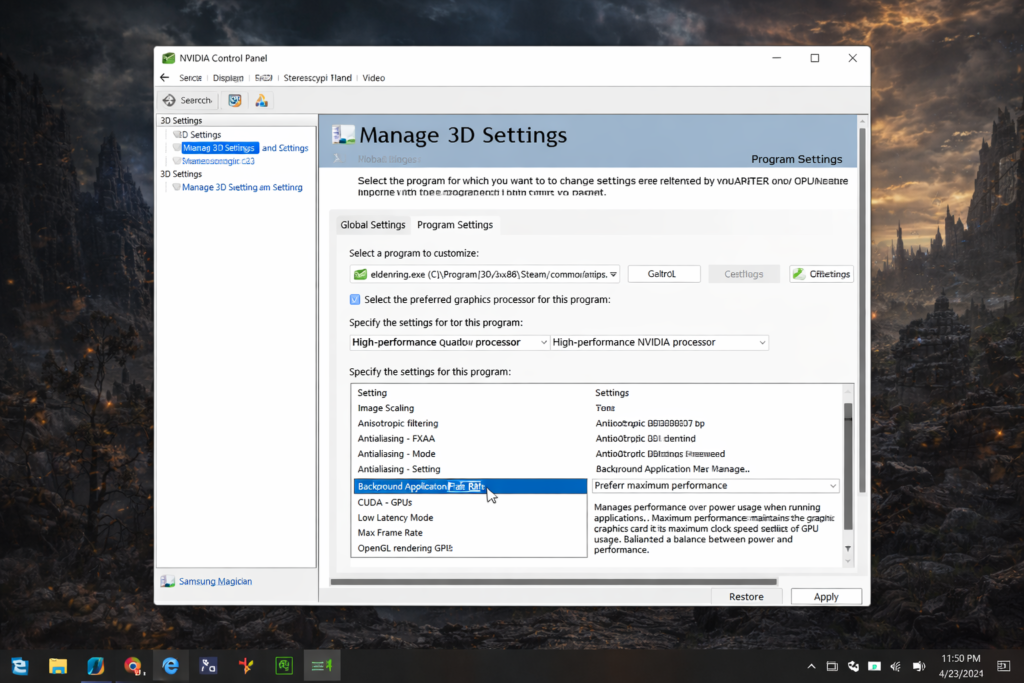
You can manually assign the game to your graphics card.
In NVIDIA Control Panel, open Manage 3D Settings, add Elden Ring, and choose the High-Performance GPU option.
Users with AMD graphics cards can perform a similar setup using AMD Radeon Software.
This ensures the game runs on the dedicated graphics card instead of integrated graphics.
Can Updating GPU Drivers Fix Performance?
Yes, updated drivers often include performance improvements and compatibility fixes for newer games.
Installing the latest drivers from NVIDIA or AMD can improve stability and sometimes increase frame rates.
For the best gaming performance and compatibility fixes, it is always recommended to download the latest drivers directly from the official NVIDIA driver page.
Can Changing the Windows Power Plan Improve Performance?
Yes, when Windows uses a balanced power plan, the CPU and GPU may reduce their clock speeds to save energy. Switching to High Performance mode allows the hardware to operate at higher speeds during gaming.
How Do You Enable NVIDIA Maximum Performance Mode?
Open the NVIDIA Control Panel and go to Manage 3D Settings. Under Power Management Mode, select Prefer Maximum Performance.
This setting keeps the GPU running at higher clock speeds while the game is active.
What Are the Best AMD Settings for Elden Ring?
In AMD Radeon Software, enabling features like Radeon Anti-Lag can improve responsiveness. Setting the GPU performance profile to maximum can also help maintain stable performance during gameplay.
Avoid enabling too many visual enhancements if you want higher frame rates.
Can Disabling Overlays Improve Performance?
Yes, Overlays from programs like Steam, Discord, or recording software sometimes use system resources.
Disabling them can reduce background load and provide slightly smoother gameplay.
Can Disabling Fullscreen Optimization Improve Performance?
In some cases, disabling full-screen optimization reduces input delay and improves stability.
You can do this by opening the game’s executable file properties and enabling the Disable Fullscreen Optimization option.
Do Background Apps Reduce Performance?
Yes, Applications running in the background compete for CPU, RAM, and sometimes GPU resources.
Closing unnecessary programs before launching the game helps ensure better performance.
How Do You Verify Elden Ring Game Files in Steam?
If you suspect corrupted game files, verifying them through Steam can help.
Open the game properties in Steam, navigate to Local Files, and select Verify Integrity of Game Files. Steam will automatically repair missing or damaged files.
Best Settings for Elden Ring Performance:
What Are the Best Graphics Settings for Elden Ring PC?
Balanced settings often provide the best experience.
High texture quality usually looks great without hurting performance too much, while medium shadows and effects can maintain stable frame rates.
Adjusting settings gradually helps you find the best balance for your system.
Which Graphics Settings Affect Performance the Most?
Some settings impact performance more than others.
Shadows, draw distance, and reflections are usually the most demanding settings in many modern games. Lowering them slightly can significantly improve frame rate.
Does Ray Tracing Reduce Elden Ring Performance?
Yes, Ray tracing requires additional calculations for lighting and reflections.
While it can improve visual realism, it also increases GPU workload and can lower frame rates on many systems.
Does Installing Elden Ring on an SSD Improve FPS?
Installing the game on an SSD mainly improves loading times. However, it can also reduce stuttering because game assets load faster.
For smoother gameplay, SSD installation is usually recommended.
Performance Troubleshooting and Optimization:
How Do You Fix Low FPS and Stuttering in Elden Ring?
Low FPS and stuttering can come from several issues.
Common fixes include updating drivers, lowering demanding graphics settings, closing background programs, and installing the game on an SSD.
Monitoring system usage while playing can help identify the exact cause.
How Do You Fix a CPU Bottleneck in Elden Ring?
If your CPU is limiting performance, try lowering CPU-intensive settings such as shadows or draw distance.
Closing background applications can also free up CPU resources.
Does GPU Overclocking Improve Elden Ring FPS?
Overclocking can provide a small performance boost by increasing GPU clock speeds.
However, the improvement is usually modest, and you should always monitor temperatures to avoid overheating.
Many gamers try overclocking to squeeze extra performance from their graphics cards. Understanding what overclocking a GPU actually does can help you decide if it is worth the risk.
Can High GPU Temperature Cause Performance Issues?
Yes, when GPUs reach very high temperatures, they reduce their clock speeds to protect the hardware. This process is called thermal throttling.
Proper cooling and good airflow inside the PC case help prevent this issue.
Temperature can also impact GPU performance, especially during long gaming sessions. Learn more about is 85 Celsius hot for GPU and when temperatures become dangerous.
Why Does Elden Ring Stutter on High-End PCs?
Even powerful systems can experience stuttering.
Shader compilation, background tasks, or CPU limitations may cause small frame time spikes during gameplay.
Updating drivers and clearing the shader cache sometimes helps reduce this issue.
Does Windows 11 Affect GPU Performance?
Windows 11 itself does not reduce performance, but incorrect settings can cause problems.
Keeping the system updated and using the correct power plan helps maintain stable performance.
Monitoring and Diagnostics:
How Can You Monitor GPU Usage in Elden Ring?
Monitoring tools allow you to see real-time GPU usage, temperature, and clock speeds.
Programs like MSI Afterburner show this information directly on screen while you play.
How Do You Check Hardware Bottlenecks in Elden Ring?
Hardware monitoring tools help identify system bottlenecks.
If CPU usage stays near 100% while GPU usage remains low, the CPU is likely the limiting factor. If VRAM is full, texture settings may need to be lowered.
Additional Performance Factors:
Can Anti-Cheat Affect Elden Ring Performance?
Anti-cheat systems occasionally use CPU resources while running in the background.
Although the impact is usually small, it can sometimes affect performance on lower-end systems.
Does Shader Cache Affect Elden Ring Performance?
Yes, the shader cache stores compiled shaders, so the game does not need to recreate them every time.
If the cache becomes corrupted, clearing it can reduce stuttering and improve stability.
FAQ’s:
Is low GPU usage bad in Elden Ring?
Not always. If your FPS is stable near the 60 FPS limit, the GPU may not need to work at full capacity.
Can Elden Ring run on integrated graphics?
Yes, but performance will usually be much lower than when using a dedicated GPU.
Does increasing graphics settings improve GPU usage?
Yes, Higher graphics settings increase the workload on the GPU, which can raise GPU utilization.
Why is my GPU only using 50% in Elden Ring?
This usually happens when the CPU becomes the limiting factor or when the game reaches its FPS cap.
Can outdated drivers cause low GPU usage in Elden Ring?
Yes, Old graphics drivers may reduce performance or prevent the GPU from working efficiently.
Conclusion:
Low GPU usage in Elden Ring on PC is usually caused by CPU bottlenecks, the 60 FPS limit, background applications, or incorrect GPU settings. In most cases, low GPU usage in Elden Ring is not a hardware failure but a configuration issue. Updating drivers, adjusting graphics settings, and ensuring the game uses your dedicated GPU can significantly improve performance and stability.