
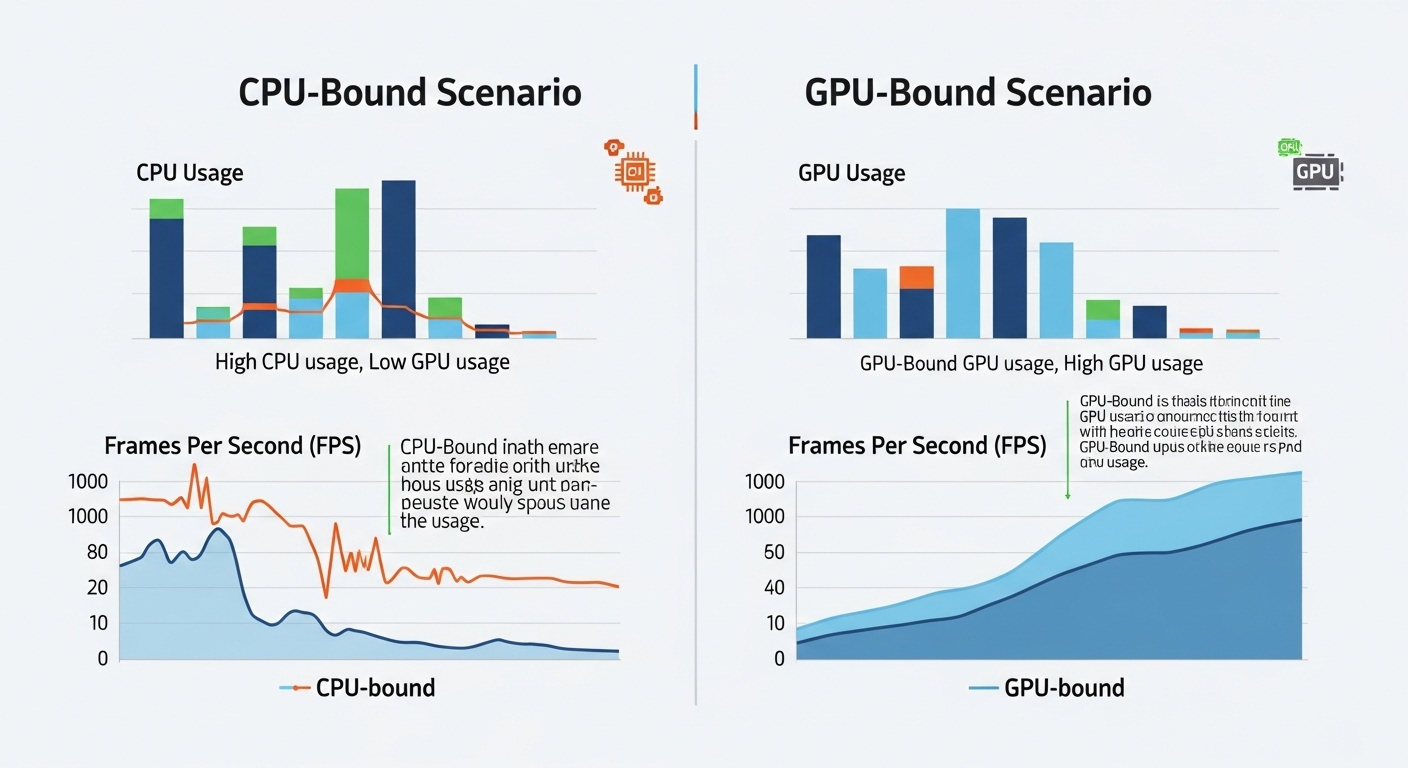
GPU-bound means your graphics card is the main performance limit in a game or application. The GPU is working at maximum capacity, so increasing graphics power improves FPS, while upgrading the CPU or lowering CPU load makes little difference.
In this guide, we will explore what GPU-bound means and how it helps ensure better frame rates, smoother gameplay, and efficient use of your system’s hardware.
What does GPU-bound mean in gaming?
GPU-bound mean? Your graphics card does most of the work. When a game is GPU-bound, FPS depends mainly on the GPU rather than the CPU. The GPU runs at full load, especially during high-resolution or graphics-intensive scenes, which is normal in modern gaming.
CPU-bound vs. GPU-bound explained:
When a game is CPU-bound, the processor limits performance. When the GPU is bound, the graphics card is the bottleneck.
| Condition | Main Limitation | Upgrade Benefit |
| CPU Bound | Processor speed | A faster CPU improves FPS |
| GPU Bound | Graphics card power | A better GPU improves FPS |
| Balanced | Both equal | Smooth, optimized system |
Also Read: Is AutoCAD CPU or GPU Intensive?
Is GPU-bound good or bad?
Being GPU-bound is usually good for gaming. It means your GPU is fully used and your system balance is healthy.
- GPU working efficiently
- Better visual quality usage
- No major CPU bottleneck
Why does GPU usage reach 100%?
High GPU usage occurs when the game demands full rendering power.
- Ultra or high-resolution graphics
- Ray tracing or advanced lighting
- Complex visual effects or particle-heavy scenes
What happens in a GPU-limited game?
When a game is GPU-limited, the graphics card controls FPS output.
- Frame rates drop if the workload increases
- CPU upgrades have little impact
- Reducing graphics settings can improve FPS
How to Tell If You Are GPU Bound?
Signs of a GPU bottleneck:
Check these signs to confirm your system is GPU-bound:
- GPU usage stays near 95 to 100% during gameplay
- CPU usage remains lower than GPU usage
- FPS improves when reducing graphics settings
How to check CPU or GPU bottleneck?
Monitor hardware while gaming to identify bottlenecks:
- Use MSI Afterburner or HWInfo overlay
- Compare CPU vs GPU utilization
- Observe frame time for irregular spikes
Is 100% GPU usage normal?
Yes, during gaming, it is normal and often ideal.
- Shows full GPU utilization
- Indicates no CPU limitation
- Expected in demanding games
Why does FPS drop in GPU-bound scenes?
Complex graphics cause the GPU to work harder:
- More objects and textures on screen
- Advanced lighting and shadows
- GPU struggles to maintain FPS
High GPU load but low FPS explained:
Sometimes the GPU workload exceeds capacity:
- High resolution or ultra settings
- VRAM limits reached
- Older GPU architectures cannot keep up
What Causes GPU-Bound Performance?
Why do high settings make games GPU-bound?
Higher graphics settings increase rendering complexity.
- Ultra textures
- Advanced lighting
- Anti-aliasing effects
Does higher resolution cause GPU bound?
Yes. More pixels mean more work for the GPU.
| Resolution | GPU Workload |
| 1080p | Moderate |
| 1440p | High |
| 4K | Very High |
Does ray tracing increase GPU load?
Ray tracing puts heavy strain on graphics cards:
- Real-time lighting calculations
- Higher rendering cost
- FPS can drop without upscaling technologies
Can an old GPU create bottlenecks?
Older GPUs struggle with modern games:
- Limited processing power
- Less VRAM
- Slower architecture affects FPS
Does RAM affect bottlenecks?
RAM indirectly affects performance:
- Low RAM causes stutter and delays
- Slower RAM reduces CPU efficiency
- Not usually a direct GPU bottleneck
GPU Bound vs CPU Bound Comparison:
FPS limit vs GPU limit explained:
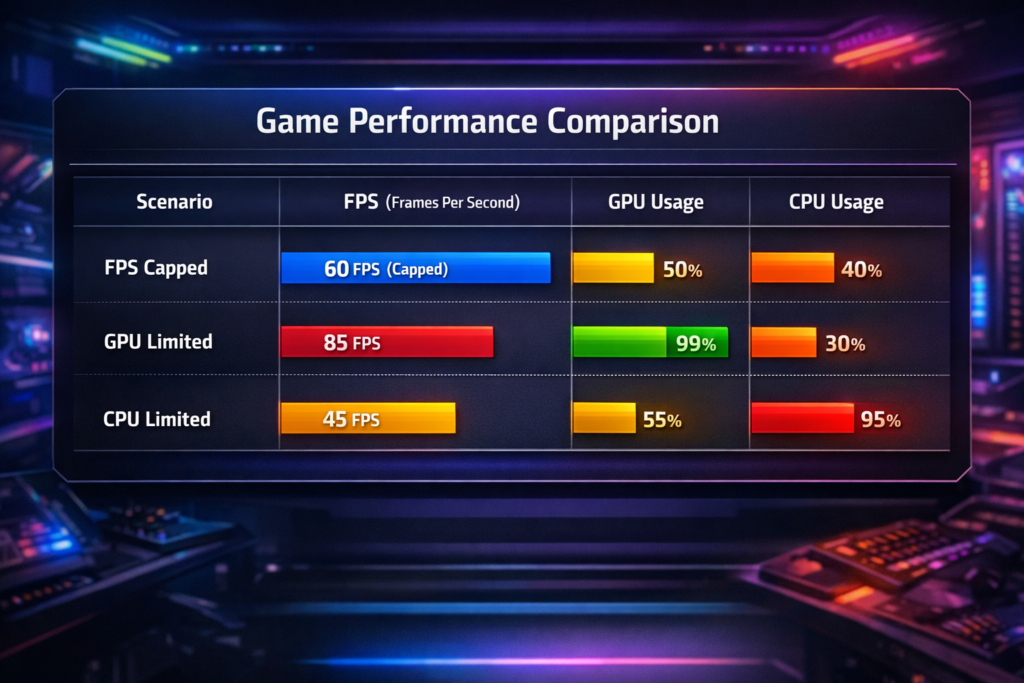
| Scenario | Result |
| FPS capped | Artificial limit imposed by settings |
| GPU limited | Hardware restricts FPS |
| CPU limited | Processing delays reduce FPS |
Why do competitive games become CPU-bound?
High FPS competitive games often rely on CPU processing:
- Simple graphics but fast refresh
- CPU handles game logic and AI
- CPU limits performance before the GPU
How does refresh rate affect bottlenecks?
High refresh rates increase CPU load:
- 60Hz gameplay is mostly GPU-bound
- 144Hz+ can stress the CPU
- Balanced hardware required
How do game engines influence performance?
Game engines decide workload distribution:
- Some use single CPU threads heavily
- Others offload more to the GPU
- Optimization differs by engine
How to Test CPU vs GPU Bottlenecks?
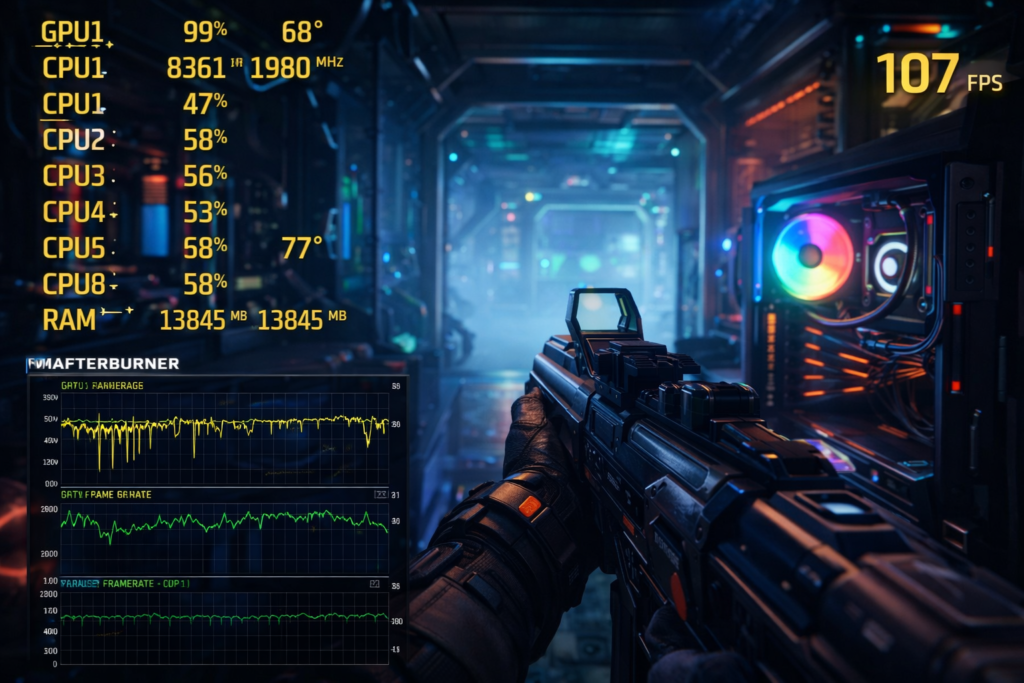
Tools to check CPU vs GPU bottleneck:
Reliable monitoring tools help with diagnosis.
- MSI Afterburner
- HWInfo
- NVIDIA FrameView
Using MSI Afterburner for testing:
Overlay monitoring helps identify bottlenecks:
- Track GPU usage
- Monitor CPU core utilization
- Observe frame time consistency
Metrics to monitor while gaming:
Important indicators of performance limits:
- GPU utilization
- CPU utilization
- Frame time stability
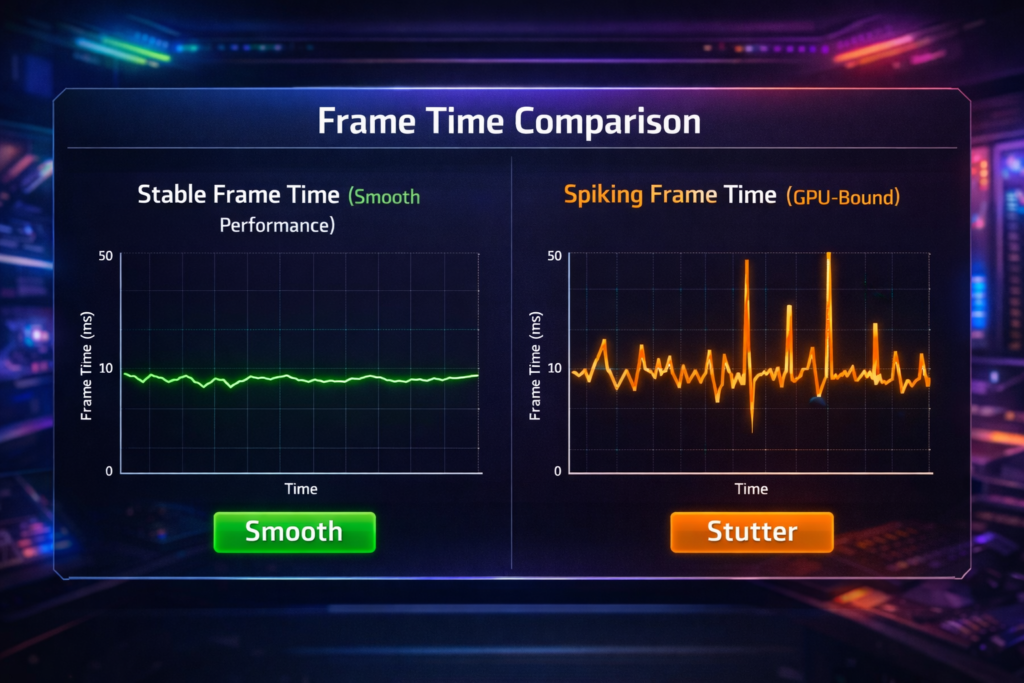
What is frame time analysis?
Frame time measures how long each frame takes to render.
| Frame Time | Experience |
| Stable | Smooth gameplay |
| Spikes | Stuttering |
| High values | Bottleneck present |
How to Fix GPU-Bound Issues?
Best settings for better FPS:
Lower GPU load to improve performance:
- Reduce shadow quality
- Scale down the resolution
- Disable heavy post-processing
Settings that impact GPU performance the most:
These settings affect performance heavily.
- Ray tracing
- Anti-aliasing
- Texture quality
Do lower graphics settings remove bottlenecks?
Yes, reducing visuals lowers GPU workload:
- Less rendering demand
- Faster frame output
- Smoother gameplay
Can DLSS or FSR reduce GPU load?
Upscaling technologies improve FPS:
- Render at lower resolution
- AI upscales image quality
- Higher FPS with minimal quality loss
Curious how modern GPUs handle ray tracing without killing FPS? Explore the official NVIDIA DLSS technology breakdown to see how AI-powered upscaling improves performance
How to balance CPU and GPU performance?
Balanced systems deliver smoother gaming.
- Match the GPU with a capable CPU
- Avoid extreme upgrades
- Monitor utilization regularly
Also Read: What Does Overclocking a GPU Do?
Should You Upgrade CPU or GPU?
Upgrading the GPU helps:
Upgrade the GPU if graphics limit performance.
- GPU usage near 100%
- Low FPS at high settings
- CPU not fully utilized
When is a CPU upgrade better?
CPU upgrade helps when processing limits FPS.
- Low GPU usage
- High CPU usage
- Stutter in fast games
When GPU-bound is actually ideal:
GPU limitation often means an optimal balance.
- Maximum graphics usage
- Smooth frame pacing
- Efficient hardware usage
Advanced GPU Performance Concepts:
What is healthy GPU usage?
Healthy gaming usage stays consistently high.
- 90 to 100% during gameplay
- Stable temperatures
- Smooth frame times
How does frame time reveal bottlenecks?
Frame time shows hidden performance issues.
- Stable graph = smooth game
- Spikes = bottleneck
- Helps diagnose stutter
Why GPU usage fluctuates
Usage changes based on scene complexity.
- Menu vs gameplay difference
- CPU waiting periods
- Engine limitations
Can background apps cause bottlenecks?
Yes, background tasks consume resources.
- Browser tabs running
- Software updates
- Recording programs
FAQ’s:
Is GPU-bound bad for gaming?
No, GPU-bound usually means your system is properly balanced for gaming performance.
Is 99% GPU usage normal?
Yes, High GPU usage during games indicates efficient hardware utilization.
Why does FPS drop when the GPU hits 100%?
The GPU reaches its processing limit and cannot render frames faster.
Can a CPU bottleneck reduce GPU usage?
Yes, A slow CPU prevents the GPU from receiving enough work.
How do I test bottlenecks quickly?
Monitor CPU and GPU usage during gameplay using performance overlay tools.
Conclusion:
Understanding what GPU-bound means helps you diagnose gaming performance correctly. A GPU-bound system usually indicates your graphics card is fully utilized, which is ideal for visual performance. Monitor usage, balance hardware wisely, and adjust graphics settings when needed to maintain smooth FPS and stable gameplay.